



The best Instagram scheduling apps for business owners can help small brands plan visually, auto-post reliably, and manage multiple platforms from one place.
Top tools include Hopper HQ, Later, Buffer, Planoly, Meta Business Suite, and Canva.
For creators who prioritize visual planning, multi-platform posting, and efficiency, Hopper HQ stands out as the most complete solution.
If you’re building a business or personal brand on Instagram, you already know the truth: posting consistently matters. But posting manually takes time and keeping your grid aesthetic cohesive is a headache. Now, imagine doing all of that while juggling multiple platforms with different demographics, algorithms, content formats, and features. Exhausting, isn’t it?
The silver lining? In 2026, Instagram scheduling tools are smarter and more creator-friendly than ever. If you choose wisely, the right scheduler won’t just help you post but will also help you stay consistent while keeping your creative flow and growing your brand, sans the burnout.
In this guide, we’re breaking down the best Instagram scheduling apps for creators and small brands and show you why Hopper HQ is the go-to visual planning tool for entrepreneurs who want both efficiency and aesthetic control.
What Makes a Great Instagram Scheduling App in 2026?
The best instagram scheduling tools share a few core qualities:
- Visual planning – You should be able to see your grid and craft a cohesive aesthetic.
- Cross-platform posting – Creators need a tool that works across major platforms such as Instagram, Facebook, TikTok, LinkedIn, and more.
- Reliable auto-posting – No reminders, no notifications. The ideal social media scheduler for creators like yourself is one that allows you to “set it and forget it”.
- Creative support – Features like AI captions, saved hashtags, and media libraries that make content creation faster.
- Simple and intuitive – This tool should save you time, not add to your workload.
With that in mind, let’s now take a look at the top scheduling apps creators love in 2025.
Best Instagram Scheduling Apps in 2026
Hopper HQ – Best for Visual Planners & Multi-Platform Scheduling
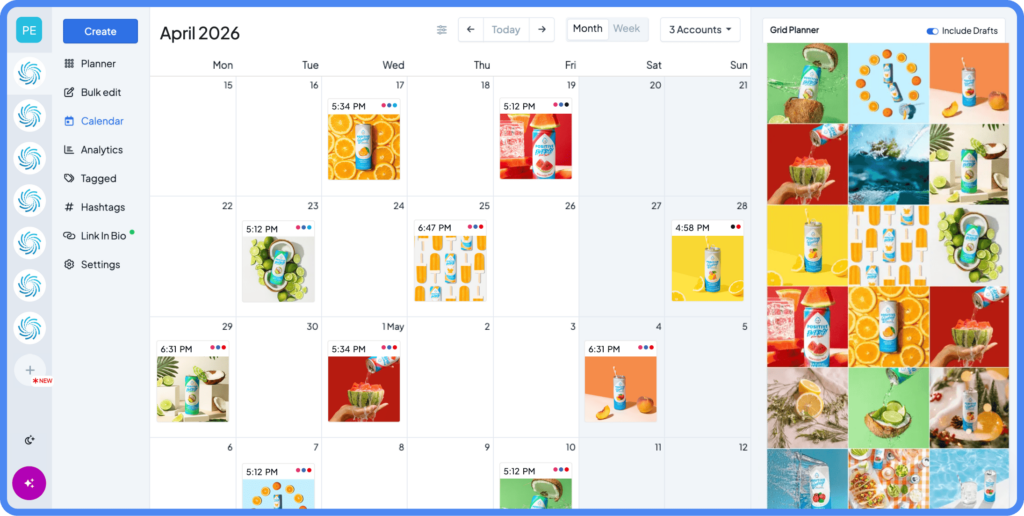
Hopper HQ is built for creators and entrepreneurs who value visual control, speed and simplicity. Its grid planner, multi-platform scheduling, and AI-powered tools make managing Instagram and other social platforms seamless.
Key Features
- Built‑in Image Editor – crop, apply filters, add text overlays or borders, adjust color/contrast/brightness, plus blur/sticker tools.
- Grid Planner / Feed Preview – drag‑and‑drop content to preview Instagram feed layout before posting.
- Auto‑post scheduling for Posts, Reels, Stories, Carousels.
- Multi‑platform scheduling – supports Instagram, TikTok, Facebook, LinkedIn, X (and more), from a single dashboard.
- Link‑in‑Bio page builder – you can create and manage a landing‑page for external links directly in Hopper HQ.
- AI-powered caption & hashtag tools, and ability to set first comment automatically.
- Bulk upload & bulk edit – upload many images/videos at once and schedule efficiently.
- Analytics & performance tracking – reach, engagement, follower growth, hashtag performance, best-time suggestions.
- Team support & collaboration features – multi-user access, approval workflows, permissions, calendars for multiple accounts.
Pros
- All‑in‑one platform: editing + planning + scheduling + analytics.
- Visual‑first: the grid planner and image editor give strong control over feed aesthetics.
- Multi‑platform: not limited to Instagram. Useful for brands active on several socials.
- Time-saving: bulk uploads, auto-posting, AI caption generation all cut down posting time.
- Flexible: supports posts, reels, stories, carousels, covering all common content types.
- Great for small teams: built‑in collaboration and multi-account support.
Cons
- As with most external tools, some advanced Story-specific features (stickers, interactive features, music) may still need native editing because of platform restrictions.
- Certain advanced features may depend on plan tier (e.g. number of accounts, bulk uploads, team seats).
Best For: Creators, photographers, boutique brands, freelancers, and small businesses owners who want a visual-first, fully featured scheduling tool with design, posting, and analytics all in one place.
Later – Good for Influencers Focused on Link-in-Bio & Feed Planning
Later remains a popular scheduling tool, especially for creators who want to combine feed planning and commerce / monetization features.
Key Features
- Visual planner with feed preview / calendar interface.
- Link-in-Bio solutions
- Posting schedule and multi-platform support (availability depends on plan—some platforms like LinkedIn or TikTok require higher-tier plans).”.
Pros
- Great if you want feed aesthetics + link‑in‑bio monetization / traffic.
- Well-known, widely used, with a good ecosystem around influencers and small brands.
Cons
- Some core features may require a paid plan or Business account to use auto-posting / premium features.
- Compared with Hopper HQ: fewer integrated editing tools, less robust cross-platform workflows (depending on plan).
- AI tools exist, but they are limited unless you’re on a higher-tier plan.
Best For: Creators or influencers who rely heavily on external links (shops, referrals, affiliate marketing) and want a polished feed with a ready link-in-bio page.
Buffer – Simple, Affordable, Minimal Setup for Basic Scheduling
Buffer is often recommended for its minimal learning curve and affordability. It supports scheduling across multiple platforms and provides basic queue and posting functionality.
Key Features
- Multi-platform posting (Instagram, Facebook, LinkedIn, X/Twitter, etc.).
- Post scheduling & queue management.
- Basic analytics and scheduling tools.
- Custom Link-in-Bio page
- Content library
- AI Assistant: generate captions, refine copy, adjust tone and length
- Drag-and-drop calendar / queue management for post rescheduling
Pros
- Low learning curve and straightforward to use.
- Affordable, good for beginners or small businesses with simple needs.
- Drag-and-drop scheduling makes calendar adjustments simple
- Unlimited use of AI under the Free plan (but scheduling is limited to 10 posts per channel).
Cons
- Lacks advanced visual planning. The grid preview is only available for Instagram professional accounts.
- Editing tools and AI features are more basic than what a “full-suite” tool would offer
- Limited analytics (advanced analytics require a paid plan).
Best For: Small businesses, solo creators, or entrepreneurs who want reliable multi-platform scheduling with AI-assisted copy and basic editing, but do not require advanced feed-planning, full media workflow, or in-depth analytics.
Planoly -Best for Grid Aesthetics, Story Planning & Light Commerce
Planoly remains a tool known for its visual planning features. It is useful for creators who care deeply about feed layout and design cohesion.
Key Features
- Visual planning with a drag-and-drop grid planner / feed preview / placeholder support.
- Post + Story scheduling (depending on account/plan)-Story auto-posting is limited to non-interactive Stories due to Instagram API restrictions.
- Hashtag manager / saved-hashtag bundles to reuse in posts.
- Multi-channel / multi-platform support
- Store / “Creator Store” functionality (on certain plans) — allows selling digital products, merch, etc.; i.e. Planoly is not just a scheduler but can also handle commerce via its “store” product.
- Comment management / social inbox / engagement tools (on certain plans).
Pros
- Excellent visual planning tools
- Basic image and video editing for quick adjustments without leaving the app.
- Useful media library, draft management and hashtag tools for creator workflows.
- Store / “Creator Store” functionality (on certain plans) — allows selling digital products, merch, etc (available only in specific regions and plan tiers).
Cons
- Many advanced or cross-channel features (video uploads, Commerce, comprehensive inbox/analytics) are gated behind paid tiers.
- Analytics and enterprise-level reporting are more limited compared to others.
- Cross-platform feature depth varies by plan and platform API limitations (so check plan details if you need a specific channel workflow).
- You’ll need a higher tier plan to access unlimited uploads.
Best For: Lifestyle creators, boutique brands, and sellers who prioritize feed aesthetics, story planning, and light commerce and are willing to use a paid plan to unlock Planoly’s fuller toolset.
Meta Business Suite – Basic, Free Scheduling Inside Instagram/Facebook Ecosystem
(screenshot of meta business suite scheduler)
For those who only need basic scheduling and are already using Instagram + Facebook, Meta Business Suite is a free, native tool worth considering. Many tool roundups list it as an entry‑level option.
Key Features
- Schedule posts (feed, carousel, possibly stories depending on configuration)— interactive Story elements like music or stickers require native editing
- Basic analytics and integrated management within the Instagram/Facebook environment.
Pros
- It’s free.
- Integrated with IG/Facebook so there’s minimal external tools needed.
- Direct analytics
Cons
- Limited platform support
- Lack of advanced features like
- No Link-in-Bio feature
- Story editing options are very limited
- There’s no full grid preview
- No drag-and-drop feed planning
🎯Best For: Small businesses or brands that just need a free, basic scheduling option for Instagram + Facebook without requiring a more robust social‑management tool.
Canva Scheduler — Best for Canva Power Users
(screenshot of canva scheduler)
If your entire creative workflow lives in Canva, using Canva’s Content Planner and Scheduler is a convenient, no-fuss way to design and publish without leaving the editor.
Key Features
- Design + schedule in one place via Canva’s Content Planner (publish directly from your designs).
- Publish to multiple platforms supported by Canva (Instagram Business, Facebook, Twitter/X, LinkedIn, Pinterest, and more) -some formats like Reels, Stories, and long-form video have publishing limitations.
- Full Canva design editor (templates, animations, stock media, text overlays, effects).
- Calendar view for planning and scheduling content.
- Team collaboration on designs (comments, shared templates).
- Integrations with media libraries and brand kits for consistent styling.
Pros
- Seamless design → publish workflow — no need to export/upload elsewhere.
- Powerful built-in design tools (best-in-class for templated graphics, easy motion/animation).
- Great for batch creation and teams that already rely on Canva.
Cons
- Not optimized for Reels or advanced Story publishing. This means there’s limited support for certain native Instagram features and formats.
- Grid/visual Instagram feed preview is limited compared with visual-first schedulers.
- Analytics and deep social-media reporting are weaker than dedicated social tools.
- Multi-account management and advanced social workflows are less robust than full social suites.
Best For: Creators, small brands, and teams who already design most of their content in Canva and want the fastest path from design to publish, especially for static posts and simple animated content.
Why Entrepreneurs and Small Business Owners Love Hopper HQ
(Insert Hopper HQ social media dashboard image or anything that suits best)
If you’re building a brand on Instagram (or juggling multiple platforms at once), you don’t need another complicated dashboard or a tool that feels like work. You need something that’s intuitive, visual, and designed for creative people, and that’s exactly why so many entrepreneurs choose Hopper HQ.
Here’s what makes it stand out:
Drag-and-Drop Grid Planner for Perfect Aesthetics
Your Instagram feed is often the first impression your brand makes. Hopper HQ’s grid planner lets you see your future posts exactly as they’ll appear, drag them into the perfect order, and build a visually cohesive brand without second-guessing. It’s creativity without the chaos, just pure visual flow.
Cross-Platform Scheduling That Saves Hours
Whether you’re posting on Instagram, TikTok, Facebook, LinkedIn, or X, Hopper HQ keeps everything in one tidy place.
No more bouncing between apps, remembering which device has which content, or setting reminders to post manually.
One calendar. One workflow. Unlimited time saved.
AI Caption Generation That Sparks Creativity
Staring at a blinking cursor? Hopper HQ’s AI assistant helps you write engaging, on-brand captions—from storytelling posts to product launches, educational tips, and more. It’s your creative co-pilot, not a replacement for your voice.
Analytics That Actually Help You Grow
You don’t need complex dashboards. You need insights that matter.
Hopper HQ’s analytics break down what’s performing, when your audience is most engaged, and how your content contributes to growth, helping you make data-driven decisions without drowning in charts.
Pricing That Makes Sense for Small Teams
Hopper HQ is built for creators, solo founders, boutiques, photographers, and small businesses—not enterprise giants. That means fair, accessible pricing without the paywall surprises or feature restrictions seen in other platforms.
Built for Creators. Loved by Entrepreneurs
Hopper HQ gives you the perfect blend of freedom + structure:
- Enough automation to save you hours
- Enough creative control to keep your brand looking exactly the way you want.
For entrepreneurs and growing brands, it’s the scheduler that feels like a creative tool, not corporate software.
Choosing What Works For You
Choosing the right Instagram scheduler ultimately comes down to what helps you stay consistent, creative, and in control of your content. Every tool has its strengths, but the one that fits best is the one that supports the way you like to work.
If you’re looking for a scheduler that handles visual planning, multi-platform posting, analytics, collaboration, and creative support in one place, Hopper HQ offers the kind of stability and depth many entrepreneurs rely on. Whatever you decide, the real win is giving yourself a workflow that saves time and leaves more room for creativity.