The 2026 Organic Social Commerce Playbook: How to Sell More Using Untapped Tools and Features

Social commerce isn’t just evolving - it’s transforming how consumers discover, consider, and buy products online. In 2026, platforms like TikTok, Instagram, Facebook, Pinterest and more are no longer just marketing channels - they’re full-fledged shopping ecosystems.
This playbook breaks down the latest tools, features, and strategies across the biggest social platforms, showing you how to turn views into clicks and clicks into conversions. We’ll dive deep into:
- How TikTok is reshaping product discovery through Shoppable Videos and Live Shopping.
- Why Instagram’s Shops, Product Tagging, and Affiliate Program are game changers for ecommerce brands.
- How Facebook’s community-driven ecosystem offers unique opportunities for brands through Marketplace, Shoppable Posts, and Live Shopping events.
- Why Pinterest remains one of the most underutilised platforms for brands, driving high-intent traffic and inspiring purchase journeys.
Whether you’re a DTC brand, scaling retailer, or established ecommerce business, this guide will help you:
- Understand the features you’re not using yet - but should.
- Build content strategies that work natively on each platform.
- Leverage emerging features to drive measurable ROI.
Social commerce isn’t the future. It’s happening right now. The brands that win will be the ones that embrace platform-native strategies, experiment boldly, and combine content with conversion seamlessly.
TikTok
TikTok has become a major force in social commerce, reshaping how shoppers discover and buy products online. Its mix of short-form video, entertainment, and in-app shopping makes it one of the most powerful platforms for ecommerce brands.
According to TikTok’s research, 75% of users say they’re likely to make a purchase while using the app, and 83% report that TikTok has influenced their buying decisions. It’s not just about discovery - TikTok drives real conversions.
Its algorithm is built to surface highly relevant, engaging content, allowing brands to reach audiences well beyond their existing followers. A single well-timed video can spark thousands of views, clicks, and purchases. Brands serious about TikTok commerce often pair the platform with a dedicated TikTok scheduler so posts go live at peak watch times without manual upload.
TikTok Shop
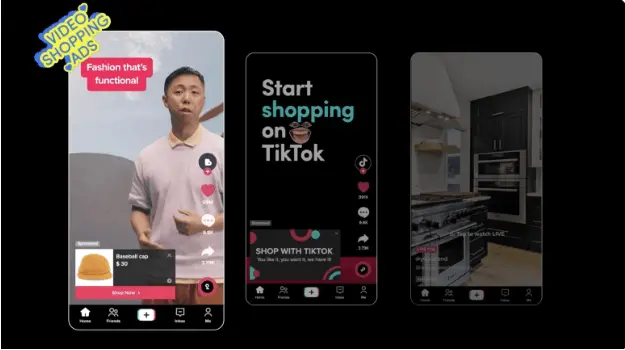
TikTok Shop is the platform’s central hub for ecommerce. It integrates shoppable videos, live events, and in-app storefronts in one place, creating an immersive shopping experience.
Why Use TikTok Shop
- Algorithm advantage: TikTok’s recommendation engine identifies shoppers most likely to buy and pushes your products to them.
- Trust and transparency: UGC-style content, visible purchase counts, and smooth in-app checkout build credibility and reduce friction.
- Live shopping events: Highly engaging, especially when paired with creators who already have loyal, engaged audiences.
When It May Not Be Ideal
- Best suited for beauty, fashion, gadgets, and lifestyle products - higher-end products can struggle.
- Less control over your brand’s presentation due to algorithm-driven discovery.
- Growing concerns over knockoffs and counterfeit products.
Setting up TikTok Shop & Shopify Integration
If taking advantage of TikTok Shop’s wide reach and commerce capabilities is a good idea for your store, then you’ll need to integrate your product catalog. If you’re on Shopify, this couldn’t be easier:
-
Check eligibility. First, make sure your store ticks the essentials:
- Valid business address in the Locations tab within Shopify.
- Operation from a supported country (e.g., US, UK, EU markets).
- Published return policy page and clear fee/shipping terms.
- Products must comply with TikTok’s prohibited list for your region.
Think of this as your “technical foundation” - get it right first to avoid later bottlenecks.
-
Install and connect TikTok Shop. In Shopify, head to Settings > Apps & sales channels > Shopify App Store. Search for the TikTok Shopify app and click Install. On the setup page, hit Connect. Either log into your existing TikTok For Business account or register as a new merchant. Review and accept the TikTok Shop terms, verify your shop info, upload required documents (e.g. ID, business license), and finish setup. This is your connection bridge - once live, Shopify becomes your TikTok backend.
-
Link product catalog and manage inventory. After setup, Shopify syncs your catalog to TikTok automatically. You can view product sync status under the TikTok app’s Settings > Product Catalog. Your catalog becomes dynamic: price and availability stay updated.
-
Map shipping & fulfillment. You decide how orders get shipped:
- Use TikTok Shipping (TikTok handles fulfillment), or use your existing setup via Shopify carriers.
- If you manage it yourself, ensure Shopify order tracking is accurate - TikTok expects timely status updates.
-
Final verification & functioning check. In the TikTok Seller Center, verify your business and link your bank for payouts. Place a test order. Confirm your inventory syncs, shipping works, and your TikTok profile reflects your product listings properly.
Shoppable Videos
Shoppable videos connect your content and commerce seamlessly. Product tags are integrated directly into videos, turning entertainment into instant buying opportunities.
Why Use Shoppable Videos
- Low friction: Viewers can watch, tap, and buy without ever leaving TikTok.
- Lower acquisition costs: TikTok rewards brands that keep users in-app by reducing ad costs for shoppable videos.
- Early mover advantage: This feature is being heavily promoted by TikTok, giving early adopters higher visibility, stronger organic reach, and a competitive edge.
- Shopping intent targeting: TikTok identifies users showing buying signals and prioritises your content to them, boosting conversion rates.
Tips for High-Performing Videos
- Start with a strong hook within the first 3 seconds to capture attention.
- Use authentic, UGC-style content over polished ads - authenticity converts better.
- Tag products early in the video to maximise exposure.
- Offer free shipping and TikTok-exclusive discounts to trigger algorithm boosts.
- Prioritise products with 4.5+ star reviews - TikTok promotes highly rated items.
- Use trending sounds, hashtags, and visual themes for wider organic reach.
- Pin product links in the comments for quick, easy purchasing.
Affiliates
TikTok’s Affiliate Center lets brands partner with creators to drive sales at scale. It combines social proof with reach, helping your products gain credibility fast. You can:
- Open collaboration: Allow any creator to promote your products for a preset commission rate.
- Targeted collaboration: Handpick creators, set custom commission rates, and send free samples while specifying deliverables like videos or livestreams.
Why Use TikTok Affiliates
- Low risk: Pay commission only after a confirmed sale.
- Algorithmic boost: TikTok prioritises affiliate-led content in feeds and For You pages.
- Data-driven insights: Built-in analytics show which creators and campaigns perform best.
- Scalable reach: Hundreds of creators can promote your products simultaneously.
Live Shopping
TikTok Live Shopping blends entertainment and ecommerce by letting brands sell products directly through live-streamed events.
Why Use Live Shopping
- High engagement: Real-time interaction builds trust and drives faster buying decisions.
- Creator collaborations: Co-host streams with influencers to leverage their established audiences.
- Exclusive offers: Flash discounts and limited-time bundles work well for creating urgency.
- Algorithmic boost: TikTok promotes Live Shopping streams aggressively, increasing reach.
Best Practices for Live Shopping
- Build hype beforehand with teasers, countdowns, and reminders.
- Demonstrate products live to show real benefits and spark impulse purchases.
- Use interactive Q&As and polls to engage viewers.
- Highlight special offers and limited stock to drive conversions.
TikTok Content Strategy
Here’s a step-by-step playbook to create native TikTok content that ties directly to social commerce and drives sales. Short, punchy. Practical.
-
Pick a hero and an offer. Choose one product (or bundle) with strong reviews and margin. Add an incentive: free shipping, TikTok-exclusive code, or a limited-time bonus. Make the value obvious in the first few seconds.
-
Define 3 audience problems to solve. List the top pains or desires your product addresses. Each problem becomes a content angle and a hook. Keep them specific: stain on new trainers, cluttered desk, dry winter skin.
-
Build hooks that fit TikTok culture. Write 10 hooks using patterns like:
- “I wish I knew this sooner…”, “POV: your [problem] solved in 10s”
- “Don’t buy X until you see this.”
Pair each with a trending sound and 2–3 relevant hashtags. Aim for authenticity over polish.
e.l.f. Cosmetics led with a culture-first hook and custom sound, then flooded the feed with creator remixes. The native, UGC feel drove massive participation and made their product the punchline and the solution. Winning posts were amplified with paid, sustaining momentum and sales.
-
Script UGC that shows, not tells. Create 3–5 short shot-lists: unbox > problem demo > quick fix > result > CTA. Record on a phone, natural light, informal voiceover. Avoid ad-speak. Feature real hands, real spaces, real results.
-
Bake in commerce from the start. List the product in TikTok Shop, enable Shoppable Video tags, and prep a pinned comment with the code/offer. Tag the product in the first three seconds and show the price/on-screen text early. Link a matching landing page if you drive off-platform.
-
Post in batches and vary the opener. Publish 5–10 variations across a week. Keep the core demo, swap hooks, first frames, captions, sounds. Reply to comments with short product demo replies; those replies can be shoppable too.
Little Moons leaned into short, satisfying demos and ASMR-style hooks. Multiple variations hit different cravings and times of day. Consistent iteration on the best openers turned curiosity into sustained store sell-outs online and offline.
-
Amplify winners with paid. Turn the best organic posts into Spark Ads and Video Shopping Ads. Keep users in-app to benefit from lower CPAs. Duplicate winners into new ad groups rather than editing - preserve learning.
-
Layer creators and affiliates. Open Affiliate Center for broad reach, and run targeted collabs for niche credibility. Ship samples with a one-page brief (hooks, must-show moments, offer). Give creators unique codes/UTMs so you can reward what works.
-
Run Live Shopping moments. Host a 20–30 minute Live with a simple run-of-show: tease offer > demo top 3 products > answer FAQs > limited-time bundle > last-chance countdown. Pin products throughout. Co-host with a creator for reach.
-
Measure, learn, and iterate. Track early signals (3-second hold, CTR to product, add-to-cart) and downstream KPIs (CPA, ROAS). Kill the bottom 50% of creatives weekly. Scale the top 20%. Refresh hooks and sounds every 2–3 weeks.
-
Optimise your store. Your social performance is half the battle, ensuring your store is optimised for conversion is essential. Ensuring a smooth transition from socials to site is the best way to keep sales coming. If you’re on Shopify, explore the app store or speak to Shopify app experts to uncover hidden performance wins.
Pro tips to keep you honest
- One message per video. One CTA.
- Price/offer on screen early; repeat verbally near the end.
- If a creator video outperforms brand content, license it and run it as your ad.
- Comments are content: turn FAQs into new shoppable replies/videos.
- Ship fast. Trends are fleeting; your creative ops should be faster.
Instagram remains one of the most powerful platforms for social commerce. Its built-in shopping tools, massive scale, and highly engaged audience make it hard to ignore. Brands using an Instagram scheduler can keep feed posts, Reels and Stories on a single content calendar so the shoppable surfaces never go quiet.
With over 1.4 billion monthly active users, the reach is huge.
Where TikTok thrives on impulse-driven discovery, Instagram has a shopping-first mindset. Users often come ready to browse, explore, and purchase. For brands, that changes the game. Instagram isn’t just about awareness - it’s where conversions happen.
Instagram’s native checkout (available in select countries) lets users complete purchases without leaving the app. Fewer clicks. Less friction. More sales. Combined with product tagging, Shops, and shoppable Reels, Instagram creates an effortless buying journey.
The platform also attracts a slightly older audience compared to TikTok, often with higher disposable income. That makes it especially valuable for brands in lifestyle, fashion, beauty, and home spaces where purchase decisions are more considered. And while TikTok leans into raw, UGC-style content, Instagram still rewards polished, curated visuals. For brands selling premium products, that control over tone and presentation matters.
Instagram Shops
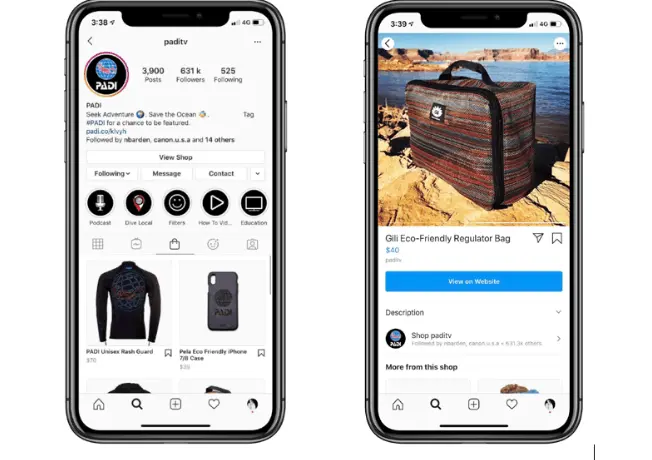
Instagram Shops act as your storefront inside Instagram, allowing you to showcase curated product collections and create a seamless buying experience.
These shops live directly on your profile via a dedicated “View Shop” button, making it easy for users to browse and buy without leaving the app.
Brands can organise products into themed collections, highlight bestsellers, and customise their shop layout to create an experience that feels polished and on-brand.
With native checkout (in supported regions), Instagram Shops minimise friction between discovery and purchase - helping turn browsers into buyers faster.
Product Tagging
Product tagging is one of Instagram’s most powerful shopping tools, leveraging its visual content to drive purchases. Brands can tag products across posts, Stories, Reels, and Lives - making it easy for users to browse and buy without leaving the platform.
Why Use Product Tagging
- Seamless shopping: Allows instant checkout within the app, reducing drop-offs.
- Algorithm advantage: Posts with product tags are boosted in feeds and discovery surfaces, increasing organic reach.
- Wider exposure: Tagged products feature in Instagram Shop tabs, Explore shopping results, and related product recommendations.
How to Do It Well
- Focus on polished, aspirational visuals. Unlike TikTok, Instagram rewards curated content - but authentic lifestyle imagery still performs.
- Tap into emotional buying. Show how products solve problems, capture seasonal trends, or inspire new styles.
- Reels dominate Instagram, with 150 billion daily views. Use hooks in the first three seconds to stop the scroll and incorporate trending sounds, hashtags, and themes.
- Use carousels for bundles, “Shop the Look” features, and curated collections that tie back to your Instagram Shop.
Quick Tips for Better Results
- Tag products early: The earlier you tag, the more likely users are to engage before swiping past.
- Use trending music: Posts with popular audio are boosted in Instagram’s algorithm and surface higher in Reels.
- Hashtag strategy matters: Use a mix of niche, trending, and shoppable hashtags to increase discoverability without appearing spammy.
3-Second Hook Formulas for Reels
Before diving into examples, know this: you have just three seconds to grab attention before users scroll past. Hooks make or break performance.
- Problem > Tease > Solve: Identify a relatable pain point, tease the solution (your product), and encourage viewers to keep watching for the reveal.
- Transformation: Showcase a before-and-after result. Perfect for lifestyle, beauty, and home brands where visual impact sells.
- I Tried [X] So You Don’t Have To: Leverage relatable, UGC-style reviews for authenticity and trust.
Instagram Collaborative Collections
Collaborative Collections make shopping on Instagram more social and community-driven. Users, creators, and brands can save products into shared collections that act like co-curated wishlists.
When a user or creator saves your tagged product or post, they can choose to make the collection private or collaborative. In collaborative collections, multiple people can contribute products and posts - increasing visibility and influence.
Why Use Collaborative Collections
- Increased organic reach: Friends of collaborators see saved products, exposing you to new and highly relevant audiences.
- Built-in social proof: Users trust products recommended or saved by people they follow, making purchases feel safer.
- Evergreen exposure: Unlike Stories or Reels, collaborative collections live longer and continue to drive engagement beyond the initial post.
Affiliate Content
Instagram’s Affiliate Program lets creators earn commissions by tagging your products in their content. You set rates in Meta Commerce Manager, and creators discover your products via the Affiliate Marketplace or direct invites.
Creators can create Reels, Stories, Carousels, or Lives, tagging your products so their audience can shop instantly.
Why Use Affiliate Content
- Low risk: You only pay commission after confirmed sales.
- Authentic influence: Creator content feels natural and genuine, increasing conversion likelihood.
- Boosted reach: Instagram pushes affiliate-tagged content, especially in Reels.
- Highly scalable: Hundreds of creators can simultaneously promote your products.
Pro Strategy: Merging Affiliate Content with Collaborative Collections
By combining affiliate-led content with collaborative collections, you extend your product’s shelf life and multiply its exposure. Here’s how:
- Recruit creators via Instagram’s Affiliate Program or third-party tools like AspireIQ or Upfluence.
- Encourage creators to make Reels showcasing your products, tagging them directly.
- Ask creators to save these Reels into collaborative collections.
- Their audiences discover, engage, and share these collections.
This creates continuous promotion of your products and increases prioritisation in Instagram’s shopping algorithm.
Instagram Content Strategy
To convert Instagram’s audience into shoppers, create content that balances aspiration, inspiration, and shopping intent.
-
Choose a hero product and offer. Select a top-selling or high-margin item and layer an incentive: limited-time discount, free shipping, or exclusive Instagram-only bundle.
-
Define three audience motivations. List three lifestyle aspirations or pain points your product speaks to - each becomes a content angle and hook.
-
Build scroll-stopping hooks. Write 5–10 hooks matching Instagram’s visual tone: “The secret to [desired look]”, “3 ways to style [product] this season”, “What’s trending right now in [category].” Use trending music and match captions to your hook for better retention.
-
Mix UGC and polished content. Blend influencer-generated content with high-quality product visuals. For premium brands, mix aspirational imagery with authentic creator storytelling.
Glossier combines high-quality visuals with everyday UGC, leaning into authenticity while maintaining brand polish. This hybrid approach drives both discovery and purchase intent.
-
Bake in commerce features. Always enable product tagging in posts, Stories, and Reels. Link Instagram Shop collections and highlight exclusive offers directly in captions.
-
Lean into Reels dominance. Reels drive the majority of Instagram’s organic reach. Create short, vertical videos featuring outfit reveals, “how-to” styling tips, or aspirational home setups.
-
Use creators and affiliates strategically. Leverage influencers to build trust and scale reach. Run targeted affiliate partnerships for niche products, while using open collabs to seed wider awareness.
-
Optimise and iterate. Use Instagram Insights — or a deeper social media analytics view that pulls every channel into one report — to track saves, shares, and Shop conversions. Replicate winning hooks, sounds, and content types, refreshing creatives every 2–3 weeks.
Plan every shoppable post in one place.
Schedule TikTok, Instagram, Facebook and Pinterest content from one visual calendar. Free for 14 days · Cancel anytime.
Facebook remains a key player in social commerce, sharing many of the same shopping features as Instagram thanks to being part of the Meta ecosystem. Brands running Facebook alongside Instagram benefit from a shared social media calendar so cross-posts, Stories and Shop campaigns stay coordinated week to week.
Where Instagram leans toward inspiration, trends, and curated aesthetics, Facebook is more community-driven and informational. Its groups, recommendations, and local networks make it particularly effective for nurturing deeper relationships with customers.
Its audience also skews slightly older, making it especially relevant for home, family, lifestyle, and gifting products. However, beauty, fashion, and trending products can still perform very well here.
Unlike Instagram, Facebook is less focused on in-app purchases. Many brands use Facebook to drive traffic to their own websites, which works well for:
- Larger basket sizes
- Promoting cross-sells and bundles
- Capturing emails for retargeting
- Driving sign-ups for offers and loyalty programs
- More expensive purchases that require longer decision cycles
Facebook’s shopping experience is also more sectionalised than Instagram’s. Features like Facebook Shops and Marketplace sit alongside - rather than within - the main feed, giving brands structured spaces to showcase their products.
Shoppable Posts
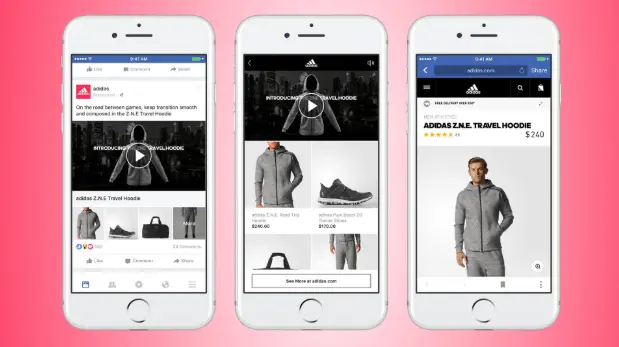
Shoppable posts turn everyday Facebook content into a direct sales channel. Posts, videos, and ads can include product tags that link users straight to your site or checkout page.
Best Practices for Shoppable Posts
- Use clear, compelling visuals - lifestyle imagery works, but Facebook audiences are also receptive to sales-driven formats like clean product shots with pricing info.
- Write longer, informational captions when needed - ideal for products where benefits, reviews, and offers play a big role in conversion. Use appropriate tools to gather and collate these reviews, such as Judge.me or Loox.
- Include a hook in the first two lines since Facebook truncates longer captions. Build curiosity and drive “See More” clicks.
- Use carousels to showcase bundles, “Shop the Look” setups, or multiple related products.
- Focus on video-first content where possible - Facebook continues to prioritise video in its algorithm.
Facebook Shops
Facebook Shops act as a customisable storefront inside the platform where users can browse, explore, and buy products without friction. Unlike traditional posts, Shops provide a dedicated shopping environment optimised for conversions.
Why Use Facebook Shops
- A centralised hub where you can display your entire product catalog in one place.
- Fully integrated with Instagram Shops via Meta Commerce Manager, meaning one catalog powers both platforms.
- Ability to create curated collections based on trends, bundles, seasonal campaigns, or promotions. Shopify apps such as Sort’d Collection Merchandiser can help sort collections on Shopify, but also help you uncover what products should and shouldn’t be in collections.
- Supports in-app checkout where available, but also allows you to redirect customers to your website if preferred.
- Provides access to built-in analytics for tracking sales, visitor behaviour, and conversion performance.
Best Practices
- Keep shop layouts clean, visual-first, and easy to navigate.
- Highlight bestsellers, limited-edition products, and themed collections.
- Optimise product titles and descriptions with Facebook search-friendly keywords to improve visibility.
- Regularly refresh featured items to maintain an updated, dynamic shopping experience.
- Use high-quality visuals and short videos to showcase products directly within the shop.
Facebook Marketplace
Facebook Marketplace connects your products with high-intent shoppers who are actively browsing for deals and inspiration. Unlike Shops, which feel more like a curated storefront, Marketplace operates like a search-driven marketplace where users seek specific products.
How It Works
- You list your products in Marketplace through Meta Commerce Manager or directly from your Shop catalog.
- Marketplace users can filter by location, price, category, and condition, making it especially powerful for discovery.
- Your products appear in both Marketplace search results and across other Facebook shopping surfaces.
Why Use Marketplace
- Ideal for brands targeting local audiences and driving nearby foot traffic.
- Works well for lower-cost, trending, and seasonal products where purchase decisions are faster.
- Great for testing products with high search demand and validating pricing strategies.
- Complements your Shop by increasing visibility beyond your followers, tapping into Facebook’s broader discovery engine.
Best for Brands That
- Sell lifestyle, home, beauty, and gifting products with strong visual appeal.
- Want to move inventory quickly through discounts, bundles, or limited-time promotions.
- Cater to audiences making quicker, less considered purchase decisions.
Pinterest has evolved into one of the most powerful visual discovery platforms for ecommerce. Unlike other social platforms, where shopping is often secondary, Pinterest users arrive with high intent - they’re actively planning, researching, and looking to buy.
This makes Pinterest especially valuable for ecommerce brands. Its audience comes with specific goals in mind, whether that’s redecorating a home, planning a trip, or refreshing a wardrobe. As a result, the likelihood of purchase is significantly higher compared to other social channels.
Pinterest content also has a much longer lifespan. While TikTok or Instagram posts often fade within days, Pins can continue driving traffic and conversions for months or even years. Because Pin content has such a long shelf life, scheduling it consistently with a Pinterest scheduler keeps your discovery engine running with minimal upkeep.
It performs best in categories like lifestyle, fashion, beauty, home, travel, fitness, gifting, and crafts, making it an ideal platform for brands that want to inspire shoppers while driving measurable results.
Shoppable Pins
At the heart of Pinterest are Pins - visual bookmarks that users save and revisit later. By turning these into Shoppable Pins, brands can connect inspiration directly to purchase.
Why Use Shoppable Pins
- Drive direct traffic to product or collection pages, helping convert inspiration into measurable sales.
- Showcase multiple products in one Pin, making it easier to upsell and cross-sell.
- Perfect for visual storytelling - bring together product tags, strong imagery, and call-to-actions.
Best Practices for Shoppable Pins
- Use lifestyle-driven imagery that inspires users to imagine products in context.
- Stick to a 2:3 aspect ratio (ideally 1,000 × 1,500 pixels) for maximum visibility.
- Include your logo or brand signals subtly to build trust.
- Optimise Pin titles and descriptions using Pinterest SEO (see below).
Pinterest SEO
Pinterest is as much a visual search engine as it is a social platform. Success relies on optimising Pins, boards, and product catalogs for search.
How to Optimise for Pinterest SEO
- Use keyword-rich titles and descriptions: Focus on user intent. Think like your audience - what would they search for?
- Leverage Pinterest Trends Tool: Find trending keywords and seasonal spikes, then integrate them naturally.
- Tag relevant categories: Always set product categories for better exposure in Shop tabs.
- Optimise boards: Use descriptive names that match your audience’s search behaviour.
Product Catalog
Pinterest’s Product Catalog is the backbone of its shopping experience. Uploading your catalog automatically generates Product Pins enriched with real-time details like pricing, availability, and direct checkout links.
Why Use Product Catalogs
- Gives products enhanced visibility across Pinterest surfaces, including search, related Pins, and Shop tabs.
- Ensures Pins stay up to date with real-time pricing and stock levels.
- Allows you to showcase entire collections while driving high-intent traffic to your site.
Tips for Optimising Product Pins
- Use the Pinterest Trends Tool to identify high-traffic keywords and trending styles.
- Group products into themed collections that match seasonal campaigns.
- Write descriptions that are benefit-focused and fully optimised for Pinterest SEO.
Verified Merchant Program
Pinterest’s Verified Merchant Program helps brands establish credibility and gain premium placement.
Why Join
- Gain a blue checkmark on your profile, signalling trust to shoppers.
- Get priority placement in Shop tabs, search, and related Pins.
- Access enhanced analytics to track performance.
- Increase brand discoverability through Pinterest’s dedicated shopping surfaces.
How to Apply
- Set up your Pinterest Business account.
- Upload your Product Catalog.
- Meet Pinterest’s merchant guidelines (clear pricing, shipping, and return policies).
- Submit your site for review - Pinterest typically approves within a few days.
Idea Pins
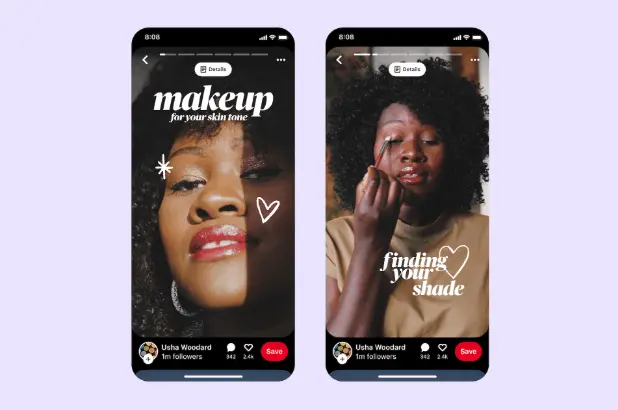
Idea Pins are Pinterest’s take on Stories - multi-slide, interactive Pins combining video, images, and text overlays.
Why Use Idea Pins
- Designed for inspiration-led content like tutorials, lookbooks, and DIY guides.
- Drive deeper engagement through multi-step narratives.
- Ideal for brands wanting to educate, inspire, and subtly sell.
Tips for Better Idea Pins
- Keep slides short, engaging, and visually aligned with your brand.
- Mix video, static images, and captions to improve retention.
- Embed product tags when showcasing shoppable content.
Collection Pins
Collection Pins let you combine a hero image or video with several supporting Pins underneath.
Why Use Collection Pins
- Ideal for “Shop the Look” campaigns where multiple products work together.
- Perfect for grouping complementary products or seasonal collections.
- Encourages users to explore more of your range without leaving the Pin.
Best Practices
- Use high-quality imagery for the hero asset.
- Link to curated category or collection pages for smooth shopping journeys.
Pinterest Boards
Pinterest Boards act as curated visual landing pages for themed content, trends, or campaigns.
Why Use Boards for Social Commerce
- Group Pins into collections that guide shoppers through inspiration to purchase.
- Use boards to support seasonal campaigns, gift guides, or product launches.
- Collaborate with influencers or creators to co-curate boards and expand reach.
Best Practices
- Use descriptive, SEO-friendly board names for better search performance.
- Balance educational and inspirational Pins with shoppable ones.
- Include links to product and collection pages where relevant but avoid being overly promotional.
- Use Pinterest Analytics to track performance.
Pinterest Analytics
Pinterest Analytics is available within your Pinterest Business Hub and provides data to help you improve performance.
Key Metrics to Track
- Impressions & reach: See how often your Pins surface in search and discovery.
- Saves: Measure inspiration-driven engagement.
- Outbound clicks: Track how many users visit your product or landing pages.
- Conversion insights: Understand which Pins lead to purchases.
How to Use Analytics
- Focus on high-performing Pins and replicate their formats.
- Use Insights to identify trending topics and produce content around them.
- Combine product-level analytics with catalog performance for a full view of ROI.
- Monitor engagement metrics per board to optimise organisation and naming strategies.
Leave With This In Mind…
Social commerce in 2026 is an ecosystem - not a single-channel strategy. TikTok fuels discovery. Instagram drives inspiration and purchase intent. Facebook blends community-driven trust with structured shopping experiences. Pinterest connects moments of planning with high-intent buying.
But what works today may not be enough tomorrow.
Organic social commerce is shifting fast. Algorithms are prioritising immersive, shoppable content and rewarding brands that integrate ecommerce seamlessly into storytelling. Features like AI-powered product recommendations, personalised shopping journeys, and live-streamed retail are becoming central to how consumers shop.
Looking ahead, expect to see:
- AR-driven shopping experiences - from virtual try-ons to “shop the room” visualisation tools.
- AI-powered trend prediction - helping brands identify and react to emerging product trends faster.
- Deeper integrations with creators - blurring the lines between content, community, and commerce.
- Cross-platform shopping journeys - where a single saved Pin, Reel, or TikTok leads to multi-platform engagement.
For brands, this means now is the time to test, learn, and iterate. Start small, double down on what works, and integrate shoppable moments wherever your audience spends their time.
Social commerce isn’t just a marketing strategy anymore. It’s a competitive advantage. And the brands that adapt fastest will own the next wave of ecommerce growth.
If you’re ready to bring TikTok, Instagram, Facebook and Pinterest into one shoppable workflow, start your free 14-day trial of Hopper HQ here — visual-first, easy to use, cancel anytime.
Take your social game further with Hopper HQ.
Plan, schedule and auto-post to every channel in one place. Free for 14 days · Cancel anytime.