Posting the same content across several social media platforms can quickly become time consuming. Many creators, small businesses, and social media managers manage accounts on Instagram, TikTok, LinkedIn, Facebook, and X. Publishing content individually on each platform wastes valuable time and makes it difficult to stay consistent.
The good news is that you can post to multiple social media platforms at once using the right workflow or a social media scheduling tool.
In this guide you will learn:
- How to post on multiple platforms at once
- The best tools for cross platform posting
- How to post videos across several platforms
- How to do it for free or with automation
To make the most of your time and effort, it’s essential to use the right tool. If you’re a busy business owner, try Hopper HQ today, and start posting to all your platforms at once with just a few clicks.
What does posting on multiple platforms at once mean?
Posting on multiple platforms at once means publishing the same piece of content to several social networks simultaneously.
This can include posting:
- The same photo to Instagram and Facebook
- A video to TikTok, Instagram Reels, and YouTube Shorts
- A promotional post to LinkedIn, Facebook, and X
- Marketing updates across all social media channels
This strategy is often called cross posting.
The goal is to maximize reach without needing to manually upload the same content multiple times.
What Are the Benefits of Posting on Multiple Social Media?
Embracing multi-social media posting brings several concrete benefits for companies and creators alike:
1) Broader Reach and Awareness:
By sharing content on multiple networks, you expose your message to a larger combined audience. This gives your content more exposure and helps reach a wider audience, making your brand visible to different segments of users across platforms. For a small business or influencer, that means more potential followers and customers discovering your content.
2) Time and Resource Efficiency:
Rather than manually crafting custom posts for each channel every time, cross-posting lets you leverage one content idea in several places. This saves time and workload since you’re not reinventing the wheel for each platform. With a smart workflow, a social media manager can spend less effort on repetitive content creation and focus more on strategy or engagement. Small teams and solo entrepreneurs especially benefit from this efficiency, as it allows them to maintain an active presence on multiple platforms without needing large budgets or staff.
3) Consistent Presence and Frequency:
Multi-platform posting makes it easier to keep all your social accounts active and up-to-date. Instead of letting one channel go quiet, you can maintain a steady flow of content everywhere. This consistency is valuable because posting regularly on each app helps keep your audience engaged and signals algorithmic activity. Studies show that consistency in social posting is a “non-negotiable for long-term success,” as brands that post frequently tend to see higher engagement and growth. A cross-posting strategy ensures no audience is left behind on any platform.
4) Improved Engagement:
Reaching more people naturally leads to the chance for more likes, comments, and shares. The greatest benefit of cross-posting is often an increase in overall audience engagement across platforms, which makes your brand more popular and visible in multiple social communities. Fans who follow you on one network may engage with your content on another, and consistent multi-platform interaction helps build deeper connections.
5) Content Longevity and ROI:
When you invest time in creating a high-quality piece of content (a video, a blog post, an infographic, etc.), cross-posting lets you get more mileage out of that content. You can adapt it for various channels and extend its lifespan. This means a better return on the content creation effort – one idea can generate engagement many times over. For influencers who often repurpose their best photos or videos on different apps, or businesses syndicating an announcement across networks, this is a smart way to maximize value.
6) Adaptable Brand Messaging:
Using multiple platforms also allows a brand to show different facets of its personality or messaging style on each, while still maintaining a unified core message. For example, a company might be playful on TikTok, professional on LinkedIn, and informative on Twitter – but all those posts reinforce the same brand values. This flexibility helps in resonating with platform-specific audiences without losing the overall brand coherence. It also offers more avenues to interact (e.g., responding to comments on various sites), thus strengthening customer relationships.
In summary, multi-social media posting can amplify your reach, save you time, and keep your online presence consistent and engaging. It’s a force multiplier for digital marketing efforts, turning one piece of content into a broader campaign across the social spectrum.
Why posting manually across platforms is inefficient
Many people still post manually by logging into each platform and uploading the same content one by one.
This approach creates several problems.
It wastes time
Uploading the same post to five platforms can take 15 to 30 minutes.
It reduces consistency
If posting takes too long, creators often skip platforms or delay publishing.
It makes planning difficult
Manual posting prevents teams from scheduling content in advance.
It increases the risk of mistakes
Captions, hashtags, or media files can easily be forgotten or uploaded incorrectly.
For creators, marketers, and small businesses, automation solves these issues.
How to post on multiple social media platforms at once
Learning how to post on multiple platforms at once doesn’t have to be complicated. Here’s a simple step-by-step guide to get started:
1) Choose a Social Media Automation Tool Like Hopper HQ
There are several tools available that allow you to post to all social media at once, but Hopper HQ stands out for its user-friendly interface and powerful features. It supports platforms like Instagram, Facebook, LinkedIn, TikTok, Pinterest, YouTube Shorts, Bluesky, and Twitter/X.
2) Create an Account and Set Up Your Accounts
Sign up for Hopper HQ and connect your social media profiles. Most tools support multiple accounts per platform, which is especially helpful for agencies or teams managing several brands.
3) Upload Your Visuals and Create Your Captions
Once your accounts are connected, you can upload your images or videos and start crafting your captions. Hopper HQ allows for bulk uploads, making content creation a breeze.
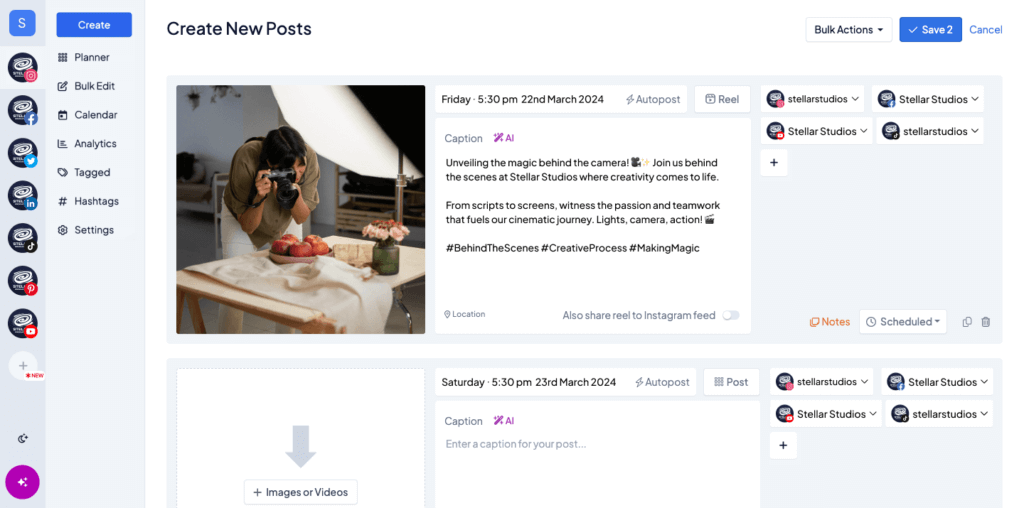
Pro Tip: Use Hopper HQ’s split caption feature to effortlessly customize captions for each platform. This means your Instagram post can have hashtags while your LinkedIn post remains more professional—without extra work.
4) Select Your Desired Dates and Times
After creating your content, schedule each post by selecting the optimal dates and times based on when your audience is most active. Hopper HQ even offers suggested best times to post.
5) Hit Publish and You’re Done!
Once you’re happy with your content and schedule, simply hit publish (or schedule), and the tool takes care of the rest. Say goodbye to the hassle of logging in and out of multiple accounts!
How to post videos on multiple platforms at once
Video content is now the most important format across social media.
Many creators want to publish the same video across:
• TikTok
• Instagram Reels
• YouTube Shorts
• Facebook Reels
• LinkedIn video
To post videos across platforms effectively:
- Use a vertical video format
- Keep videos under 60 seconds when possible
- Avoid platform watermarks
- Upload once using a scheduler that supports multiple platforms
This allows a single piece of content to reach several audiences without additional editing.
Top Apps That Post to All Social Media
Here are 3 popular apps that you should consider when looking for how to post on multiple platforms at once.
1) Hopper HQ:
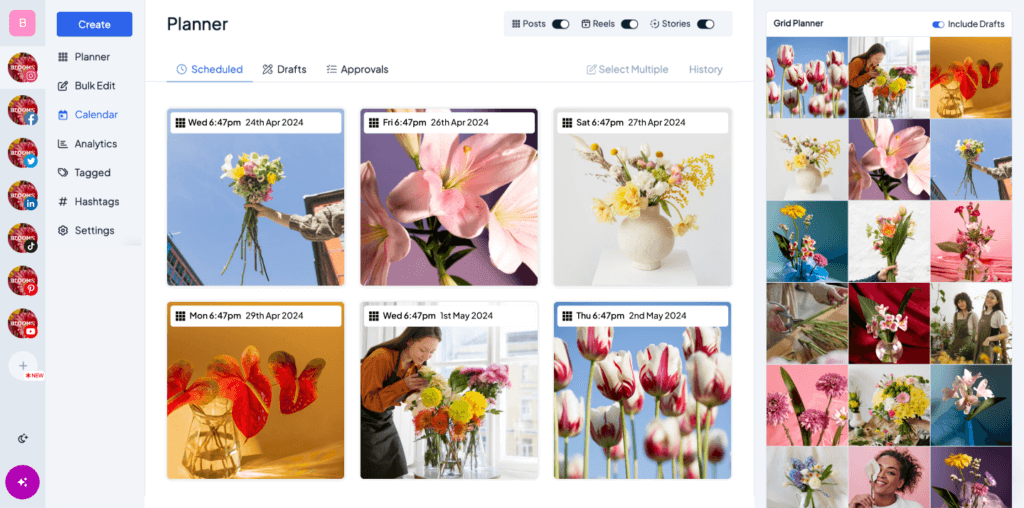
Hopper HQ is a powerful visual-first scheduler that supports Instagram, Facebook, Twitter, LinkedIn, Bluesky, Pinterest, YouTube Shorts, and TikTok.
What sets Hopper HQ apart is its Strategy Planner, a smart planning tool that generates a personalized content plan based on your specific social channels, performance metrics, and audience data. This helps users post with intention rather than guesswork. Another standout feature is Split Captions, which allows you to create customized captions for each social platform—so your message can stay consistent while still feeling native to each channel’s tone and format.
Hopper HQ is ideal for teams or busy business owners who want to combine ease of use with strategy-driven posting.
Pricing: Free trial, then one subscription plan at $16 a month on the yearly plan
2) Hootsuite:
One of the most well-known social media management platforms. Hootsuite supports a wide range of networks and allows scheduling posts to multiple profiles at once.
It offers a calendar view, collaboration features for teams, and analytics. Hootsuite also has social listening capabilities (to monitor mentions or keywords) and a unified inbox for messages. One of Hootsuite’s most powerful features is its Streams tool, where you can track conversations, brand mentions, hashtags, and keywords across your social channels in real time. This allows you to engage directly from the dashboard, monitor sentiment, or keep an eye on competitors and industry trends.
Hootsuite is ideal for larger companies and marketing agencies who are looking for a more robust social media management tool.
Pricing: Provides a 30-day free trial, and then plans start at $99 a month on the yearly plan
3) Sprout Social
Sprout Social is an all-in-one social media management platform designed to help brands not only publish and schedule content but also deeply analyze performance, manage customer interactions, and collaborate across teams. Known for its intuitive design and powerful reporting features, Sprout Social is widely used by marketing agencies, mid-size companies, and enterprise-level organizations.
Sprout is known for its highly customizable reports and robust analytics. You can track metrics like engagement, impressions, link clicks, audience growth, and campaign performance. Reports can be branded, scheduled, and exported, making them especially useful for agencies or departments reporting to stakeholders.
Sprout Social is a great tool for brands focused on reputation management, social listening, and influencer marketing
Pricing: Provides a 30-day free trial, and the pricing starts at $199 a month on the yearly plan
Types of Content to Post Across Platforms
One common question when looking into how to post on multiple platforms at once is what kind of content can (or should) be cross-posted? The good news is that almost any type of social media content can be adapted for multi-platform posting – as long as you tweak it to fit each channel’s format. Typical content types shared across platforms include:
1) Text Updates:
Simple text posts such as status updates, announcements, catchy one-liners, or quotes. For instance, a short announcement or tip can be posted on X (Twitter), LinkedIn, and Facebook with minimal changes. Even a longer blog post can be distilled into key points for a text-based post on another network.
2) Images and Graphics:
Photos, illustrations, memes, and infographics are highly shareable across Instagram, Facebook, LinkedIn, Pinterest, and more. Visual content often needs resizing or cropping for different aspect ratios, but the core image or graphic can remain the same. An engaging graphic can be posted on multiple platforms to visually convey your message or branding.
3) Videos:
Video content can range from short clips (TikTok, Instagram Reels, YouTube Shorts) to long-form videos (YouTube, Facebook). A great video is ideal for cross-posting because it’s engaging and often easily repurposed. For example, a promo video or tutorial might be uploaded to YouTube, shared as a short teaser on Instagram, and even clipped into snippets for Twitter. Many brands will repost the same video across TikTok, Instagram, and YouTube to capitalize on each channel’s audience.
4) Links and Blog Posts:
If you publish a blog article or news on your website, you can share the link across social platforms (often with a preview snippet or image). Twitter, Facebook, LinkedIn, and even Pinterest support link sharing. The accompanying caption can be adjusted per platform, but you’re essentially promoting the same content everywhere. This drives traffic from multiple sources back to your site.
5) Interactive Posts:
Many platforms allow interactive content like polls (Twitter, Facebook, LinkedIn) or Q&A stickers (Instagram Stories). While the exact mechanics might differ, you can pose the same question or poll across networks to engage each audience segment. For example, a brand could run a poll on Twitter and a similar one on Instagram Stories to gather feedback universally. The content – a question or survey – is consistent, just delivered in platform-specific ways.
It’s worth noting that each platform has its own content norms and technical requirements. An image that thrives on Instagram might need a different caption approach on LinkedIn, and a text thread on Twitter might be better condensed for Facebook. Multi-social media posting doesn’t mean one-size-fits-all; it means one core message adapted appropriately. That’s why you should consider a tool like HopperHQ, where not only can you bulk publish posts onto multiple platforms at the same time, but also create unique captions for each one.
Can you post on multiple platforms at once for free?
Yes, there are free ways to cross post content, but they usually come with limitations.
Free options may include:
- manual posting
- limited cross posting features from platforms
- free tiers of social media scheduling tools
Free tools often limit:
- the number of scheduled posts
- the number of social accounts
- advanced analytics features
For individuals posting occasionally, free solutions may be sufficient. For businesses or creators publishing daily content, automation tools save significant time.
Best practices for posting on multiple social media platforms
Cross posting works best when content is adapted for each network.
Here are some recommended practices.
Adjust captions for each platform
LinkedIn captions may be longer and more professional, while TikTok captions are usually short and conversational.
Use platform specific hashtags
Hashtags that perform well on Instagram may not work the same way on LinkedIn.
Optimize for different audiences
Your audience may behave differently on each platform.
Avoid duplicate watermarks
Re uploading videos with visible watermarks from another platform can reduce reach.
Schedule posts at optimal times
Engagement varies depending on the platform and audience.
Scheduling tools help identify the best posting windows.
See best times to post on Instagram.
When should you post on multiple platforms?
Posting across platforms works particularly well for:
- social media managers handling several brand accounts
- small businesses managing marketing alone
- creators producing video content regularly
- agencies running multi channel campaigns
Instead of creating separate posts for each platform, one piece of content can be distributed across multiple networks.
Wrap up:
Multi-social media posting is no longer a “nice-to-have” — it’s essential. The ability to manage and maintain a presence across multiple platforms helps you reach a broader audience, stay consistent with your brand, and make the most of every piece of content you create.
With the right tools, multi-platform posting doesn’t have to be overwhelming. From simple schedulers to powerful strategy suites, there’s a solution for every workflow and budget. The key is to find a platform that not only saves time but also helps you post with purpose, tailor content for each audience, and measure what’s working.
If you’re ready to automate how you post on multiple platforms, try HopperHQ and experience the power of smarter, more strategic multi-platform posting.
Frequently asked questions
Can you post to multiple social media platforms at once?
Yes. You can post to multiple social media platforms at once using a social media scheduling tool that supports cross platform publishing.
What is cross posting on social media?
Cross posting means publishing the same content across multiple social media platforms to reach a larger audience.
What is the easiest way to post on multiple platforms?
The easiest method is using a social media scheduler that allows you to upload content once and publish it across several networks automatically.
Can you schedule posts on multiple platforms?
Yes. Most social media scheduling tools allow you to schedule posts in advance and publish them automatically across several social networks.