The 9 Best Later Alternatives in 2026

Later is one of the best-loved visual schedulers, especially for Instagram. Its grid preview and link-in-bio tool set the standard for a lot of creators. But it isn’t the only option, and it isn’t always the right one. People usually look for Later alternatives over price, post limits, or the need to plan more than Instagram from a single calendar.
This is an honest look at the best Later alternatives in 2026. We lead with Hopper HQ because it’s what we build, and we’ll be straight about where Later or another tool is the better fit. Later remains an excellent Instagram-first choice, and we’ll say so.
Worth naming the pattern we see most often: people don’t leave Later because they stopped liking visual planning. They leave because they started needing visual planning somewhere other than Instagram, and found themselves running two tools to get it.
Start your free 14-day trial →
What Later is genuinely good at
Later built its name on visual Instagram planning. The visual calendar, media library and grid preview make it satisfying to plan a considered feed, and its link-in-bio product is one of the most recognized in the space. If Instagram is your primary channel and link-in-bio is central to how you sell, Later is a well-built, popular choice.
It’s also worth crediting what Later got right conceptually, because it shapes this whole category. Planning a feed as a feed, rather than as a list of scheduled items, is the correct model for anyone whose profile is a shop window. Every tool on this list that plans visually is working in a tradition Later helped establish.
Where people tend to move on is when they want that same visual planning across every network, more generous limits, or simpler pricing.
Why people leave Later
The second network arrived. TikTok, then LinkedIn, then Pinterest. Once Instagram is one of four channels rather than the channel, an Instagram-first tool starts to feel like half a solution.
Limits landed at the wrong moment. Post caps are invisible right up until you’re planning a launch, and then they decide your week for you.
Link-in-bio was the reason to stay, and then it wasn’t. Once other tools included a link-in-bio page as standard, paying a premium for that one feature got harder to justify.
Reminders instead of publishing. Any format that needs you to finish the job by hand undermines the point of scheduling ahead.
If Instagram genuinely is your whole world and the limits don’t bite, staying is a perfectly sensible answer.
How we compared these tools
We make one of these tools, so here’s the method. We compare on things that hold true for more than a quarter: how visual the planning is, how many networks you can genuinely plan from one calendar, whether publishing is hands-off, whether link-in-bio is included or gated, and how limits and pricing scale.
We don’t print prices. They change often, and in this part of the market the limits attached to a price matter more than the number itself. Check each tool’s pricing page, and look at the caps as carefully as the cost.
What to look for in a Later alternative
Visual planning. A grid preview and drag-and-drop calendar you can trust. If you’re moving from Later, this is the thing you’ll most notice the absence of, so test it with your real images rather than a demo.
Multi-network reach. Planning every channel you use from one place, not just Instagram. The saving isn’t the subscription, it’s not maintaining two calendars.
True auto-publishing. Posts, Reels, and Stories that go live automatically. Check format by format, since support genuinely varies.
Link-in-bio. Built in, and ideally not locked to a higher tier. If it drives sales for you, treat it as a core requirement rather than a bonus.
Limits and pricing. How many posts, profiles, and users you get, and how the price scales. Work out what a launch month costs, not an average one.
Later alternatives at a glance
| Tool | Best for | What stands out |
|---|---|---|
| Hopper HQ | Visual planning on every network | Grid preview, auto-publishing, link-in-bio included |
| Buffer | Simple, clean scheduling | Approachable free tier |
| Planoly | Instagram-only visual planning | Tight grid and link-in-bio |
| Plann | Instagram planning with strategy | Guidance and visual planning |
| Metricool | Analytics and ads together | Reporting plus ad management |
| Loomly | Guided content planning | Post ideas and approvals |
| Hootsuite | Enterprise monitoring | Monitoring streams and team workflows |
| Sprout Social | Premium analytics | Custom reports, with listening as an add-on |
| SocialPilot | Agencies on a budget | Bulk scheduling and client management |
Pricing note: this guide compares on durable features rather than prices, which change often. Check each tool’s pricing page for current numbers.
The 9 best Later alternatives
1. Hopper HQ, best for visual planning across every network
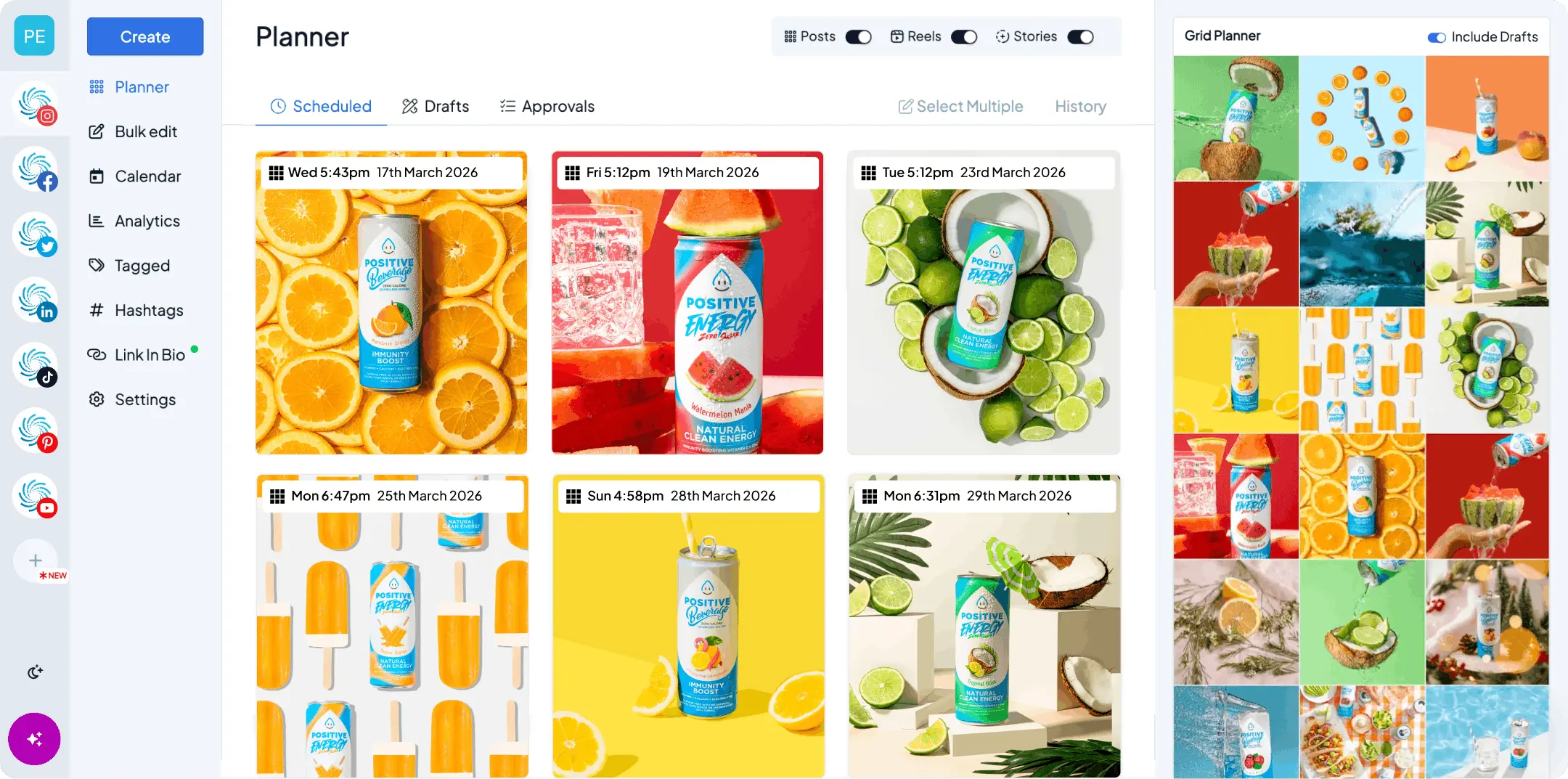
Hopper HQ brings the same visual, feed-first approach as Later, then extends it to every network from one calendar.
Key features: drag-and-drop calendar, a grid preview you can trust, bulk upload, true auto-publishing for posts, Reels and Stories, a link-in-bio tool included on every plan, hashtag explorer, an AI assistant, and iOS and Android apps, plus free tools like an Instagram grid maker for puzzle feeds.
Best for: creators and small teams who love visual planning but want to plan every major network from one calendar, not just Instagram.
Pricing model: per account, so a second brand costs a second account rather than a new tier.
Hopper HQ vs Later: both are visual and Instagram-strong, but Hopper HQ carries that grid-first planning across all your networks, includes link-in-bio on every plan, and prices per account rather than in feature-gated tiers. See the full Hopper HQ vs Later comparison.
Watch for: if link-in-bio is the single most important thing you do, compare the two tools directly.
The honest summary: if you like how Later works and want it everywhere, this is the shortest move. If Instagram is genuinely the only channel that matters to you, the case for switching is weaker.
2. Buffer, best for simple, clean scheduling
Buffer is the go-to for straightforward, text-led scheduling with a gentle learning curve.
Key features: clean interface, publishing queues, an approachable free tier, a Start Page link-in-bio and the newer Buffer Insights analytics product.
Best for: individuals and small teams who want simple scheduling without visual planning.
Buffer vs Later: Buffer is simpler and lighter, while Later is far more visual and Instagram-focused. See Buffer alternatives.
Watch for: visual planning is light, and it does not provide a full social-listening suite.
Coming from Later, the adjustment is real: queues instead of a grid. If your content is mostly words and links, that’s a relief. If it’s mostly images, you’ll feel the loss.
3. Planoly, best for Instagram-only visual planning
Planoly is a dedicated visual planner for Instagram and Pinterest.
Key features: grid preview, visual planning, a link-in-bio tool and content scheduling for a focused set of networks.
Best for: creators who mainly plan a considered Instagram grid.
Planoly vs Later: the two are close on Instagram visual planning, and it often comes down to interface preference and pricing. See the full Planoly vs Later comparison.
Watch for: narrower network scope than a full multi-network scheduler.
This is a sideways move rather than an upgrade, and that’s fine if your reason for leaving is price or feel rather than reach.
4. Plann, best for Instagram planning with strategy
Plann pairs visual Instagram planning with strategy prompts and guidance.
Key features: visual grid planning, content strategy tools, a link-in-bio tool and analytics.
Best for: creators who want a nudge on what to post, not just where to place it.
Plann vs Later: both are Instagram-first visual planners, with Plann leaning more into coaching and strategy.
Watch for: Instagram-centric, so less suited to broad multi-network teams.
Useful if your blocker is the blank page rather than the scheduling. Less useful if you already know what you want to post and just need it out the door.
5. Metricool, best for analytics and ads together
Metricool is an analytics-led all-in-one that also schedules.
Key features: cross-network analytics, competitor tracking, ad campaign management, scheduling and a link-in-bio tool.
Best for: people who want reporting and paid campaigns alongside planning.
Metricool vs Later: Metricool is stronger on analytics and ads, while Later is more visual for Instagram planning.
Watch for: the planning experience is less visual than Later’s grid.
The pick for creators who’ve started boosting posts and want the numbers in one place. A step down in planning feel, a step up in measurement.
6. Loomly, best for guided content planning
Loomly is calendar-first and helps you decide what to post.
Key features: content calendar, post ideas and optimization tips, post previews, approval workflows and an asset library.
Best for: teams that want structure and sign-off.
Loomly vs Later: Loomly adds approvals and content guidance, while Later leads on visual Instagram planning.
Watch for: less of a visual grid focus.
Comes into its own the moment someone else has to approve your posts, which is usually the moment a creator becomes a small team.
7. Hootsuite, best for enterprise monitoring
Hootsuite is a broad, established suite for larger organizations.
Key features: wide channel support, monitoring streams, team roles and approvals, and an inbox, with advanced listening capabilities available depending on the plan or product package.
Best for: bigger teams that need monitoring and workflows.
Hootsuite vs Later: Hootsuite is broader and more enterprise, where Later is a focused visual planner. See Hootsuite alternatives.
Watch for: complexity and cost beyond what most creators need.
A big jump from a creator tool. Right when social becomes several people’s job and a brand risk. Wrong when it’s still yours alone.
8. Sprout Social, best for premium analytics
Sprout Social is a premium platform for teams that live in reporting.
Key features: strong native analytics and reporting, a polished Smart Inbox and approvals, with more advanced listening and premium analytics available as additional products.
Best for: mid-market teams and agencies with the budget for premium reporting.
Sprout Social vs Later: Sprout goes deeper on analytics, with more advanced listening and premium analytics sold separately, while Later is simpler and more visual.
Watch for: premium pricing most creators will not need.
Rarely the right answer for someone leaving Later, unless the move is also a change of job, from creator to a team that reports to stakeholders.
9. SocialPilot, best for agencies on a budget
SocialPilot is built for managing many client accounts affordably.
Key features: bulk scheduling, client management and approvals, with white-label report branding on eligible plans.
Best for: agencies and SMBs handling lots of accounts.
SocialPilot vs Later: SocialPilot is built for agency scale, where Later is a creator-friendly visual planner. See SocialPilot alternatives.
Watch for: planning is less visual than Later.
Makes sense the moment you’re posting for other people rather than yourself, and account count starts driving the bill.
How to switch from Later without breaking your feed
The risk when moving a visual tool isn’t the scheduling, it’s the assets and the bio link.
- Download your media library. Anything you edited or captioned inside Later exists only there. Pull it down before you cancel.
- Save your link list. Copy the links and labels from your link-in-bio page so you can rebuild it quickly.
- Rebuild the bio page before you swap the link. Get the new page live, check it on a phone, then change the link in your profile. Never leave a dead link in your bio.
- Rebuild your queue, then bulk upload. Load a month of content in one sitting so the new calendar looks like a plan rather than an empty grid.
- Watch one full week publish. Confirm posts, Reels, and Stories all go out as expected before you cancel the old plan.
Questions to ask before you switch
- Does the grid preview look right with my actual images, not the demo ones?
- Can I plan every network I post to here, or will I still need a second tool?
- Is link-in-bio included in the plan I’d buy, or is it a tier up?
- What are the post and profile limits, and what does a launch month look like against them?
- Do Reels and Stories publish on their own?
- If I hand my accounts to someone else next year, could they run this?
How to choose
- Want visual planning across every network, not just Instagram? Hopper HQ.
- Simple, clean scheduling on a free tier? Buffer.
- Instagram-only visual planning? Planoly or Plann.
- Analytics and ads in one place? Metricool.
- Guided planning with approvals? Loomly.
- Enterprise monitoring across many channels? Hootsuite.
- Deep analytics and reporting? Sprout Social.
- Managing many client accounts on a budget? SocialPilot.
The short version
If you love Later’s visual approach but want it across every network, with link-in-bio included and simpler per-account pricing, Hopper HQ is the natural next step. You can schedule posts, Reels and Stories, plan every network from one calendar, and let it publish automatically.
Compare the whole field in our best social media scheduler guide, or see plans and pricing.
Frequently asked questions
What is the best Later alternative?
If you want strong visual Instagram planning plus straightforward multi-network scheduling and true auto-publishing, Hopper HQ is built for that. Later is also excellent for Instagram and link-in-bio, so the choice often comes down to price and how many networks you plan.
What is Later best at?
Later helped define visual Instagram planning, and its link-in-bio tool is one of the best known in the category. If Instagram is your main channel and link-in-bio is central to how you drive traffic, it is a strong choice.
Why do people switch from Later?
Common reasons are price, post limits, wanting to plan more than Instagram from one calendar, and wanting hands-off auto-publishing across every network. If Instagram and link-in-bio are your whole world, Later may still be the right fit.
Does Hopper HQ have a link-in-bio tool?
Yes, a link-in-bio tool is included on every Hopper HQ plan rather than gated behind a higher tier. If link-in-bio is a priority, compare the two directly before you decide.
Which Later alternative is best for Instagram-only planning?
If you only care about Instagram, dedicated visual planners like Planoly and Plann focus tightly on the grid and link-in-bio. Hopper HQ gives you the same visual grid preview but also plans every other network from the same calendar.
Is there a free Later alternative?
Several tools offer limited free plans, and most, Hopper HQ included, offer a free trial so you can test the full workflow before you pay. Check the current limits on each pricing page.
What happens to my link-in-bio page if I switch?
The page itself lives with whichever tool provides it, so moving means rebuilding it and updating the link in your profile. Save your list of links first, and plan to switch the bio link over once the new page is live so you never have a dead link in your profile.
Do I lose my media library when I move?
The library is the tool's copy of your images, so it does not transfer. Download what you still need before you cancel, especially anything you have edited or captioned inside the tool rather than in your own folders.
Is a post limit really a problem?
It depends on cadence. If you post once a day to two accounts you will rarely notice. If you plan a month ahead across five accounts, or work in campaign bursts, limits are the thing most likely to push you onto a higher plan sooner than you expected.
Take your social game further with Hopper HQ.
Plan, schedule and auto-post to every channel in one place. Free for 14 days · Cancel anytime.