The 10 Best Sprout Social Alternatives in 2026

Sprout Social is a premium, analytics-led platform, and for the right team it’s excellent. But it sits at the top end on price, and a lot of teams find they’re paying for depth they never fully use. If you’re looking at Sprout Social alternatives, it’s usually about cost, simplicity, or matching the tool to what you actually do day to day.
This is an honest look at the best Sprout Social alternatives in 2026. We lead with Hopper HQ because it’s what we build, and we’ll be straight about where Sprout Social or another premium tool is the better fit. If advanced reporting and listening are core to your role, compare the relevant Sprout Social plans and add-ons carefully, and we’ll point you to the tools that do that best.
One framing that helps before you shop: premium analytics tools are priced for the decisions they inform, not the posts they publish. If nobody is making a budget decision off your social reporting, you’re buying the wrong category.
Start your free 14-day trial →
What Sprout Social is genuinely good at
Sprout Social is a mature, premium platform with strong native analytics, reporting, a polished Smart Inbox and approval workflows built for larger organizations. More advanced listening and premium analytics are available as additional products. If reporting is central to your role and you have the budget, it’s a capable, polished choice.
It’s worth being fair about what the premium buys. Presentation-ready reporting, a genuinely good shared inbox, and permissions that hold up when a dozen people touch the same accounts are real engineering, and cheaper tools mostly don’t match them. Teams who have to defend their social spend upward tend to find that valuable.
Where people move on is price, and the realization that a simpler tool would cover what they really need.
Why teams leave a premium suite
The reports outgrew the audience. Custom reporting is worth its cost when someone acts on it. Plenty of teams build beautiful dashboards nobody opens.
The add-ons added up. Listening and premium analytics are separate products. A budget set against the headline plan can look very different by the time the configuration matches the pitch.
Publishing was the real job. If most of your week is planning and getting content out, you’re paying analytics prices for a calendar.
Headcount changed. Premium suites are priced and shaped for teams. When a team of six becomes a team of two, the tool stops fitting.
How we compared these tools
We make one of the tools on this list, so here’s how we’ve kept it useful.
We compare on durable things: how visual the planning is, whether publishing is hands-off, channel coverage, the depth of reporting, and the shape of the pricing. We don’t print prices, because they move and stale numbers mislead.
We’re also careful in this guide about the word “included,” because it does a lot of quiet work at the premium end. Listening, premium analytics, and fully white-labeled dashboards are frequently add-ons or higher tiers rather than standard features. Where that’s the case, we say so, and you should price the configuration you’d genuinely buy.
What to look for in a Sprout Social alternative
Analytics depth. Whether you need enterprise listening and custom reports, or clear, useful basics. Be honest about which decisions your reporting actually drives.
Price and value. How the cost compares to what you’ll actually use, including add-ons. Compare configurations, not headline tiers.
Simplicity. How fast your team gets productive without training. A tool people avoid is expensive at any price.
Collaboration. Approvals, roles and client access for teams and agencies. Available far below premium pricing, so don’t assume you need the top end to get it.
Publishing. Visual planning and true auto-publishing for the formats you post, checked network by network.
Sprout Social alternatives at a glance
| Tool | Best for | What stands out |
|---|---|---|
| Hopper HQ | Simple, affordable planning | Grid preview, auto-publishing, no feature gating |
| Hootsuite | Enterprise monitoring | Broad channel support and monitoring streams |
| Agorapulse | Engagement and reporting | Unified inbox on per-user pricing |
| Sendible | Agency client management | Client workspaces and integrations |
| Metricool | Analytics and ads together | Reporting plus ad management |
| Later | Instagram-first planning | Visual calendar and link-in-bio |
| Buffer | Simple, clean scheduling | Approachable free tier |
| Loomly | Guided content planning | Post ideas and approvals |
| SocialPilot | Agencies on a budget | Bulk scheduling and client management |
| Zoho Social | Zoho ecosystem users | CRM integration and value |
Pricing note: this guide compares on durable features rather than prices, which change often. Check each tool’s pricing page for current numbers.
The 10 best Sprout Social alternatives
1. Hopper HQ, best for simple, affordable visual planning
Hopper HQ is built for small teams that want to plan and publish a great-looking feed without premium pricing.
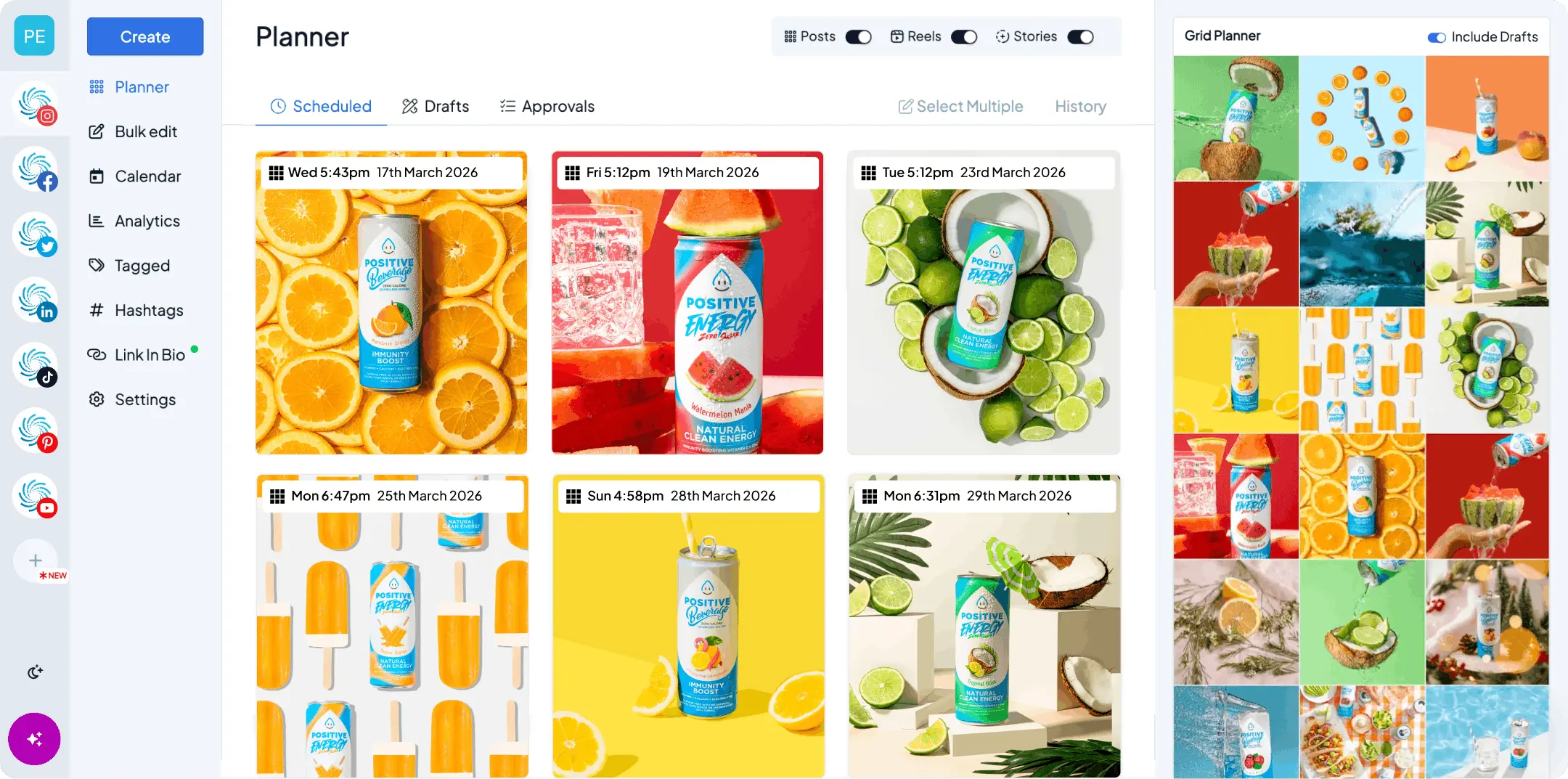
Key features: drag-and-drop calendar, a grid preview, bulk upload, true auto-publishing for posts, Reels and Stories across every major network from one calendar, a link-in-bio tool, hashtag explorer, an AI assistant, and iOS and Android apps. Analytics, link-in-bio, hashtags and AI are included on every plan.
Best for: solo creators, small businesses and lean agencies who want simplicity and value.
Pricing model: per account, with nothing important held back for a higher tier.
Hopper HQ vs Sprout Social: Hopper HQ is simpler and far more affordable, with per-account pricing and no feature gating, while Sprout Social goes deeper on analytics, with more advanced listening and premium analytics available as additional products. See the full Hopper HQ vs Sprout Social comparison.
Watch for: if custom enterprise reporting and social listening are core to your role, Sprout Social or Hootsuite go further, though the deepest listening and reporting come as add-ons or higher-tier products rather than standard features.
The honest summary: this is the right move if your reporting need is “what worked, so we do more of it” and your real job is getting good content out consistently. It’s the wrong move if you present to stakeholders who expect custom reports.
2. Hootsuite, best for enterprise monitoring
If you still need enterprise depth, Hootsuite is the closest like-for-like on breadth.
Key features: wide channel support, monitoring streams, an inbox and team workflows, with advanced listening capabilities available depending on the plan or product package.
Best for: larger teams that need monitoring across many accounts.
Hootsuite vs Sprout Social: both are premium, with Hootsuite broader on channels and Sprout often praised for cleaner analytics. See Hootsuite alternatives.
Watch for: enterprise pricing and complexity.
This is a sideways move rather than a saving. Sensible if the reason you’re leaving is fit rather than budget, for instance if monitoring matters more to you than reporting polish.
3. Agorapulse, best for engagement and reporting
Agorapulse pairs a unified social inbox with scheduling and reporting through a per-user pricing model.
Key features: social inbox, scheduling, reporting and team collaboration, with listening capabilities varying by plan and more advanced listening available separately.
Best for: teams that want a strong inbox and reporting, where paying per user still works out.
Agorapulse vs Sprout Social: Agorapulse covers similar ground in engagement and reporting, although the price advantage depends on the number of users and features required.
Watch for: per-user pricing adds up as the team grows, and listening depth varies by plan.
Run the seat math before assuming this is the cheaper option. For three people it usually is. For fifteen, it may not be.
4. Sendible, best for agency client management
Sendible is built around agencies managing many clients.
Key features: client workspaces and dashboards, approval workflows, scheduling and reporting. A fully white-labeled dashboard is available as a paid add-on on eligible higher plans.
Best for: agencies that need dedicated client workspaces, approvals and the option to add their own branding.
Sendible vs Sprout Social: Sendible is more agency-shaped and affordable, where Sprout is a premium all-in-one.
Watch for: full white labeling is a paid add-on rather than a standard feature on every plan.
If client-facing branding is part of your pitch, price the add-on in from the start. It’s the detail most likely to change the comparison.
5. Metricool, best for analytics and ads together
Metricool is an analytics-led all-in-one that also handles ads and scheduling.
Key features: cross-network analytics, competitor tracking, ad campaign management and scheduling.
Best for: teams that want reporting and paid campaigns in one place, at a fraction of premium pricing.
Metricool vs Sprout Social: Metricool delivers strong analytics value, though Sprout goes deeper on listening and custom reports.
Watch for: the planning experience is less visual.
The closest thing on this list to “premium analytics without premium pricing,” particularly if you also run paid. You give up polish and presentation, not measurement.
6. Later, best for Instagram-first planning
Later is a visual planner with a well-known link-in-bio tool.
Key features: visual content calendar, media library, best-time-to-post and link-in-bio.
Best for: creators and brands focused on Instagram.
Later vs Sprout Social: Later is a focused, affordable visual planner, where Sprout is a premium analytics suite. See Later alternatives.
Watch for: analytics are light next to Sprout.
A big change of category. Right if it turns out your team is really a creator operation with a reporting habit it inherited.
7. Buffer, best for simple, clean scheduling
Buffer is the go-to for straightforward, text-led scheduling.
Key features: clean interface, publishing queues, an approachable free tier and the newer Buffer Insights analytics product.
Best for: individuals and small teams who want simple scheduling.
Buffer vs Sprout Social: Buffer is simpler and less expensive for basic publishing needs, while its reporting remains more streamlined than Sprout Social’s premium analytics products. See Buffer alternatives.
Watch for: it does not provide a full social-listening suite.
The furthest step down in scope on this list, and occasionally exactly right, particularly for a team that has shrunk back to one person.
8. Loomly, best for guided content planning
Loomly helps teams decide what to post and sign it off.
Key features: content calendar, post ideas and optimization tips, approvals and an asset library.
Best for: teams that want structure and approvals.
Loomly vs Sprout Social: Loomly is lighter and content-focused, where Sprout adds deeper analytics, with more advanced listening available as an additional product.
Watch for: its engagement and inbox tools are less extensive than Sprout Social’s Smart Inbox and enterprise customer-care capabilities.
Good when the expensive part of your process is agreement rather than analysis.
9. SocialPilot, best for agencies on a budget
SocialPilot offers agency features at a friendly price.
Key features: bulk scheduling, client management and approvals for many accounts, with white-label report branding on eligible plans.
Best for: agencies and SMBs managing lots of accounts affordably.
SocialPilot vs Sprout Social: SocialPilot covers agency workflows for far less, without Sprout’s analytics depth. See SocialPilot alternatives.
Watch for: analytics are adequate rather than deep.
Where client count drives the bill, this is usually the biggest single saving available on this list.
10. Zoho Social, best for Zoho ecosystem users
Zoho Social is part of the wider Zoho suite.
Key features: multi-channel scheduling, monitoring, CRM integration and team collaboration.
Best for: businesses already using Zoho tools.
Zoho Social vs Sprout Social: Zoho Social is far more affordable and integrates with Zoho CRM, where Sprout is a premium standalone suite.
Watch for: best value when you use other Zoho products.
If social conversations need to land against contact records, and your CRM is Zoho, this connects two things that are otherwise awkward to join.
How to leave a premium suite cleanly
The risk here isn’t publishing, it’s losing history and permissions.
- Export the reporting first. Anything anyone has ever quoted upward, save it. Once access ends, last year’s numbers go with it.
- Save your report templates as documents. You won’t rebuild the same custom reports elsewhere, but you should know what questions they answered.
- Write down who could do what. Rebuild permissions deliberately in the new tool instead of making everyone an admin.
- Check the inbox habit. If your team replies inside the suite, decide where that work happens next before you switch, not after.
- Overlap one reporting cycle. Run both through a full month so you can compare the numbers and trust the new source.
Questions to ask before you downgrade
- Which reports does someone actually act on?
- What would we lose that we would genuinely miss in three months?
- Is listening part of our job, or a nice-to-have we inherited?
- Where does replying happen, and who does it?
- What does the new tool cost with the accounts and people we really have?
- Does it publish the formats we post, on its own?
How to choose
- Want simple, affordable visual planning? Hopper HQ.
- Still need an enterprise platform with advanced monitoring and optional listening? Hootsuite.
- Engagement and reporting, priced per user? Agorapulse.
- Agency client workspaces, with optional white-labeling? Sendible.
- Analytics and ads in one place? Metricool.
- Instagram-first with link-in-bio? Later.
- Simple, clean scheduling on a free tier? Buffer.
- Guided planning with approvals? Loomly.
- Managing many client accounts on a budget? SocialPilot.
- Already in the Zoho ecosystem? Zoho Social.
The short version
If you’re leaving Sprout Social because it’s more than you need, Hopper HQ gives you simple, visual planning that publishes for you, at per-account pricing with nothing important locked behind a higher tier. You can schedule posts, Reels and Stories, plan every network from one calendar, and let it publish automatically.
Compare the whole field in our best social media scheduler guide, or see plans and pricing.
Frequently asked questions
What is the best Sprout Social alternative?
For small businesses, creators and lean agencies that want simple visual scheduling without a premium price, Hopper HQ is built for that. If you need advanced monitoring and reporting, Hootsuite is the closest like-for-like, with advanced listening available depending on the plan or product package, and Agorapulse or Sendible are strong picks for agencies.
What is Sprout Social best at?
Sprout Social is a premium platform with strong native analytics, reporting and a polished Smart Inbox, aimed at larger teams with the budget to match. More advanced listening and premium analytics are available as additional products. If reporting is central to your role, its depth is genuinely valuable.
Why do people switch from Sprout Social?
The most common reason is cost. Sprout Social sits at the premium end, and many teams pay for analytics depth they do not fully use. If you mainly need to plan and publish a good-looking feed, a simpler, cheaper tool often makes more sense.
Is there a more affordable alternative to Sprout Social?
Yes. Hopper HQ is positioned as a simpler, more affordable option, with per-account pricing and no feature gating. Agorapulse, Metricool, SocialPilot and Zoho Social are also more budget-friendly. Confirm current numbers on each pricing page before deciding.
Which Sprout Social alternative has the best analytics?
Hootsuite is the closest on enterprise monitoring and reporting, with advanced listening available depending on the plan or product package. Agorapulse and Metricool both offer solid analytics at a lower price, though Agorapulse charges per user. If you need clear performance data rather than enterprise depth, Hopper HQ keeps analytics simple and included on every plan.
Which Sprout Social alternative is best for agencies?
Sendible offers client workspaces and an optional fully white-labeled dashboard on eligible higher plans. Agorapulse provides team inbox, reporting and collaboration features, including branded reporting options. SocialPilot is another value-focused choice for managing many client accounts, and Hopper HQ suits lean agencies that want simple visual planning with approvals included.
Will I lose reporting history if I leave?
Usually yes, so export it first. Historical reporting lives inside the platform, and once your access ends you cannot pull last year's numbers. Save anything anyone has ever quoted in a board pack before you cancel.
Is social listening worth paying for separately?
It earns its cost when your brand gets talked about without being tagged, or when support requests arrive through social. If your mentions are manageable by hand, the budget usually does more good elsewhere.
Can a simpler tool handle approvals?
Yes. Approvals are common well below premium pricing, including on Hopper HQ's team plan. What you tend to give up at lower price points is not approvals themselves but the depth of custom permissions around them.
Take your social game further with Hopper HQ.
Plan, schedule and auto-post to every channel in one place. Free for 14 days · Cancel anytime.