Instagram Reel Size in 2026: Dimensions, Aspect Ratio, and Safe Zones
Nothing tanks a good Reel faster than awkward cropping or blurry video.
You spend an afternoon shooting and editing something you’re proud of, upload it, and find the edges soft, your caption buried under the action buttons, and your logo sliced in half on your profile grid. If you post Reels every week, getting the format right once saves you hours of re-exporting later.
The good news is that Instagram is predictable about this. There’s one set of numbers to learn, and they haven’t moved in a while.
Here they are.
What size should an Instagram Reel be?
Instagram Reels should be 1080 x 1920 pixels at a 9:16 aspect ratio. That’s full-screen vertical, which is how nearly everyone watches them.
Export at those numbers and your Reel fills the phone screen with no black bars, no cropping, and no mushy compression.
| Spec | Recommendation | Notes |
|---|---|---|
| Dimensions | 1080 x 1920 px | Full-screen vertical |
| Aspect ratio | 9:16 | Instagram accepts 1.91:1 through 9:16, but 9:16 is the only one that fills the screen |
| Minimum resolution | 720 px wide | Anything lower looks soft after Instagram re-compresses it |
| Orientation | Vertical | Horizontal video gets cropped or letterboxed |
| File format | MP4 or MOV | MP4 is the safer bet |
| Video codec | H.264 | Best compatibility across devices |
| Audio codec | AAC | 128 kbps or higher |
| Frame rate | 30 FPS minimum | 60 FPS if your footage supports it |
| Maximum file size | 4 GB | Rarely a problem at these dimensions |
| Length | 3 min in-app, up to 15 min uploaded | Some accounts cap at 90 seconds. Shorter Reels tend to travel further with people who don’t follow you yet |
| Cover image | 1080 x 1920 px | Gets cropped to 3:4 on your profile grid. More on that below |
What aspect ratio does Instagram use for Reels?
9:16. That’s the tall, full-screen shape your phone already shoots in when you hold it upright.
You can technically upload anything between 1.91:1 and 9:16, and Instagram will accept it. But anything wider than 9:16 gets letterboxed with black bars or cropped in to fill the frame, and neither does your content any favors.
If you shoot on a phone in portrait, you’re already at 9:16. Nothing to change.
What resolution is best for Instagram Reels?
1080 x 1920 is the sweet spot. It’s sharp enough to survive Instagram’s compression and small enough to upload quickly.
Instagram re-encodes every video you upload. Starting from 1080p gives that process enough detail to work with. Start from 720p and the re-encode has less to hold onto, which is where the soft, blocky look comes from.
Going higher than 1080p won’t help. Instagram caps playback there anyway, so a 4K export just means a longer upload.
Instagram Reel safe zones: where not to put text
Getting the dimensions right is only half of it. Instagram layers its own interface on top of your video, and whatever sits underneath gets covered.
Meta publishes its safe zones as percentages rather than pixels. Here’s how they sit on a 9:16 frame:
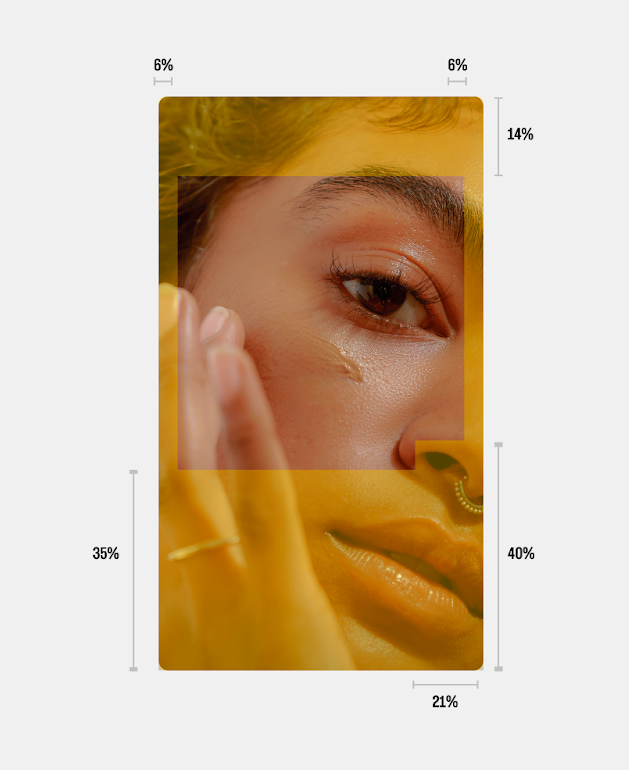
Meta’s safe zone guidance for 9:16 placements. The shaded rectangle is the area you can count on.
Converted to pixels on a 1080 x 1920 Reel:
| Edge | Meta’s guidance | On a 1080 x 1920 frame | What sits there |
|---|---|---|---|
| Top | 14% | ~270 px | Username, audio label, sponsored tag |
| Bottom | 35% | ~670 px | Your caption and the audio track |
| Bottom right | 40% | ~770 px | The like, comment, share and save rail, over the rightmost 21% (~230 px) of the frame |
| Each side | 6% | ~65 px | Screen edge |
That leaves a centered safe zone of roughly 950 x 980 pixels. It’s smaller than most people expect, and the bottom is the part that catches everyone out. Note that the bottom clearance isn’t a flat band: it deepens on the right, where the action buttons stack up.
Two more things worth knowing:
- On phones taller than 9:16, Meta may zoom your video to fill the screen, which crops content outside the safe zone, or letterbox it with black bars instead. You don’t get to choose. Keeping key elements comfortably inside the safe zone covers you either way.
- If your ad carries a disclaimer, Meta asks for the bottom 40% clear of text, logos, and key elements rather than 35%.
A simple habit: drop a 950 x 980 rectangle into the middle of your editing canvas as a guide layer, and keep faces, text, logos, and calls to action inside it. If you run ads, toggle on the Safe zone guardrail in Meta Ads Manager and it’ll overlay the same regions on your own creative in yellow before you publish.
How your Reel gets cropped on your profile grid
This is the one that surprises people.
Your Reel plays at 9:16, but your profile grid crops every thumbnail to 3:4 (1080 x 1440). Instagram moved the grid from squares to this taller shape in January 2025. The same crop applies to your photos and carousels, which we cover in our guide to Instagram post sizes and dimensions. It also matters if you cut a photo into a grid: check how the tiles sit at 3:4 before you post.
So the cover frame you picked at full height loses a slice from the top and the bottom on your profile. If your title text sat near the top of the frame, it’s gone from the grid view.
The arithmetic is worth knowing. A 1080 x 1920 cover cropped to 1080 x 1440 loses 240 pixels off the top and 240 off the bottom. Whatever sits in those two bands exists in the Reel but not on your profile.
Your grid is a shop window. Getting this right is the difference between a profile someone browses and a wall of visual noise, which is why the cover deserves its own set of numbers.
What size should an Instagram Reel cover be?
Upload your Reel cover at 1080 x 1920 pixels, the same as the Reel itself. Instagram then crops it down for each place it appears.
| Where it shows up | Crop | What to expect |
|---|---|---|
| Full-screen Reel playback | 9:16 (1080 x 1920) | The whole cover, as you designed it |
| Profile grid | 3:4 (1080 x 1440) | Loses 240 px from the top and 240 px from the bottom |
Design for the crop, not the upload. Keep your title text, your face, and anything else that earns a tap inside the centered 1080 x 1440 area, and the cover works everywhere.
How to set a custom cover
On the final screen before you post, tap Edit cover. You get two choices:
- Pick a frame from the video. Fine in a hurry, though the frame you land on is usually someone mid-blink.
- Upload your own image. This is the one worth the extra minute.
A word of warning: Instagram doesn’t let you change a Reel cover after posting. Get it right before you hit publish, or you’re deleting and re-uploading and losing whatever engagement the post already picked up.
What makes a cover worth tapping
Covers do a job that has nothing to do with the algorithm. Someone lands on your profile, scans 12 thumbnails in about three seconds, and taps one. That’s the whole decision.
A few things that help:
- Put readable text on it. Three or four words telling someone what they’ll get. Not a caption, a label.
- Size the text for a thumbnail. Your grid renders these small. If it isn’t legible at the size of a postage stamp, it isn’t legible.
- Keep a consistent look. The same font, the same color band, the same placement across your Reels makes a grid feel deliberate.
- Give text a background. A solid shape or a darkened overlay behind your words beats white text on busy footage every time.
What happens if you upload a Reel at the wrong size?
Instagram won’t reject it. It’ll just make decisions on your behalf, and you won’t like all of them.
- Horizontal video gets cropped in hard or padded with black bars, often cutting off faces
- Anything other than 9:16 gets scaled awkwardly to fit
- Low-resolution files come out visibly soft after compression
- Text near the edges disappears under the interface
To be clear about what’s actually happening here: Instagram doesn’t penalize your reach for using the wrong dimensions. There’s no hidden setting counting against you. What happens is simpler and slower. A Reel that’s hard to watch gets swiped away faster, and watch time is something Instagram does pay attention to. Bad framing costs you reach indirectly, by costing you attention first.
Are Instagram Reel dimensions the same as Stories?
The dimensions are identical. Both are 1080 x 1920 at 9:16, so you can move vertical content between the two without re-exporting.
The safe zones are not identical, though, and that’s where repurposing goes wrong. Stories put stickers, polls, and the reply bar in different places than the Reels action rail. Content that sits clear of the interface in a Story can end up half-covered in a Reel. Our breakdown of the right Instagram Story size to use has the Story-specific numbers.
| Format | Dimensions | What’s different |
|---|---|---|
| Reels | 1080 x 1920 (9:16) | Discoverable in the Reels tab, Explore, and feeds. Longer shelf life |
| Stories | 1080 x 1920 (9:16) | Temporary, follower-focused, gone in 24 hours |
| Feed video | 4:5 or 1:1 | Cropped to 3:4 on your profile grid |
Because Reels show up in more places than Stories do, framing matters more. One Reel might be seen in the Reels tab, in a feed, on Explore, and on your profile grid, each with a slightly different crop.
Do Instagram Reel ads use different dimensions?
No. Reel ads use the same 1080 x 1920 at 9:16 as organic Reels.
What changes is how much room you have. Ads add a call-to-action button and sometimes a headline on top of the regular interface, so the usable middle gets squeezed further. If your ad includes a disclaimer, Meta asks you to keep the bottom 40% of the frame clear of text, logos, and key elements.
Worth knowing: 9:16 video ads running in the Instagram Feed follow the same safe zone guidance as Reels and Stories. So if you’re running one creative organically and as an ad, build it to the tighter ad safe zone once and it’ll hold up everywhere.
Common Instagram Reel sizing mistakes
Even people who’ve been posting for years still hit these:
- Uploading horizontal footage shot in landscape without reframing it
- Putting captions in the bottom third, which is exactly where Instagram’s buttons live
- Exporting at 720p to save upload time, then wondering why it looks soft
- Reposting TikToks without checking the framing, since TikTok’s interface sits in different places. If you publish the same clip everywhere, our guide to vertical video dimensions across social media lines the platforms up side by side
- Letting Instagram pick the cover frame, which leaves your grid looking random
- Forgetting the 3:4 grid crop when designing a cover
Plan your Reels without second-guessing the format
Format problems are frustrating because you only find them after you’ve posted. By then the fix means re-exporting, deleting, and reposting, which costs you the engagement the first upload already earned.
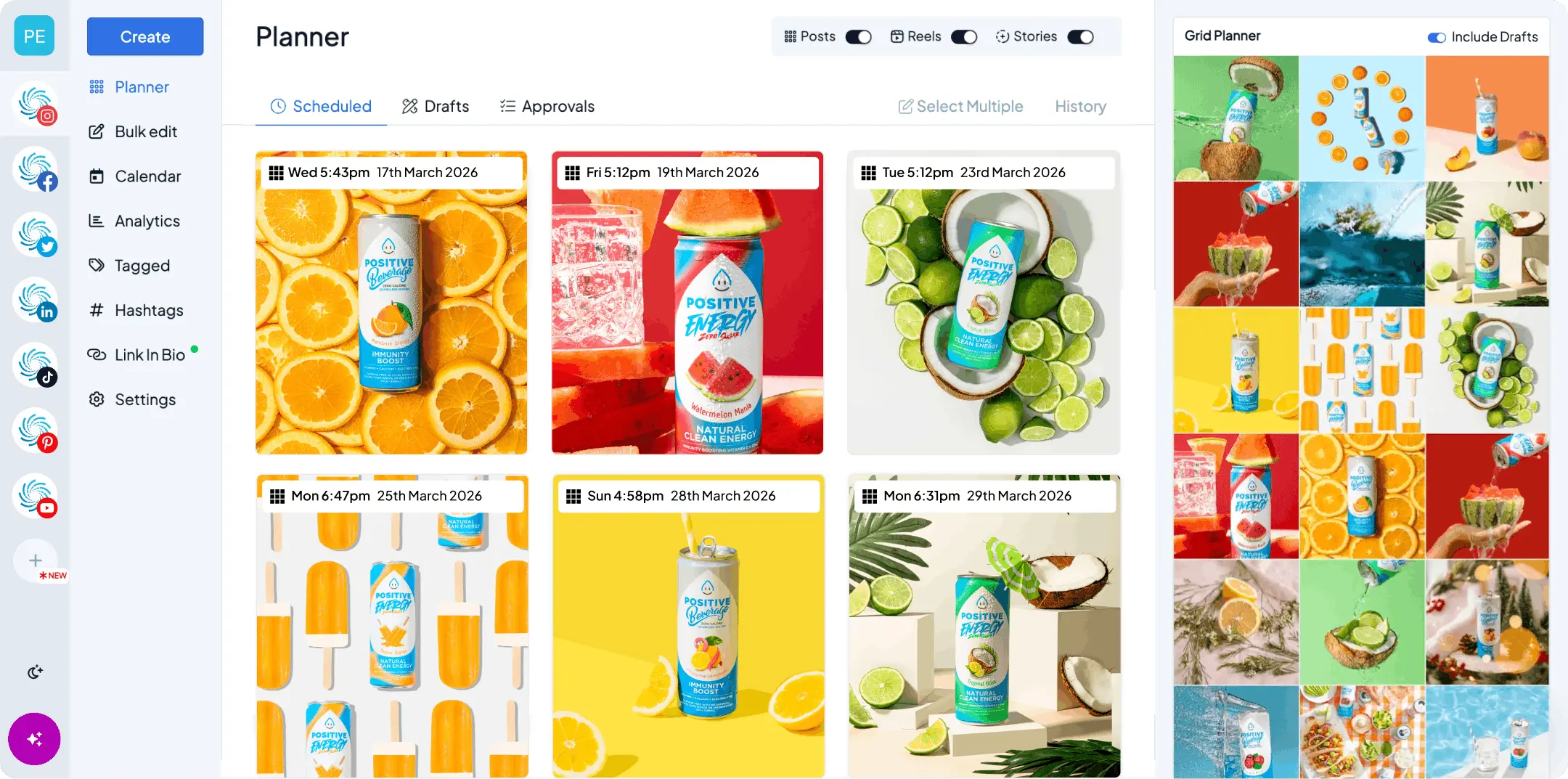
Scheduling your Reels ahead of time gives you a look at them before they’re live. With Hopper HQ’s Instagram scheduler you can:
- Preview exactly how a Reel will appear before it publishes
- Spot cropping and framing problems while they’re still fixable
- See your grid taking shape so your covers work together
- Schedule weeks of Reels in one sitting instead of posting in a panic
Think of it as a safety net, not one more thing to keep on top of.
Try Hopper HQ free for 14 days and see your Reels before anyone else does.
Quick recap
- Dimensions: 1080 x 1920 pixels
- Aspect ratio: 9:16
- Orientation: vertical
- Safe zone: roughly 950 x 980 px, centered (top 14%, bottom 35%, sides 6%)
- Cover size: 1080 x 1920, designed for the centered 1080 x 1440
- Profile grid crop: 3:4 (1080 x 1440)
- Frame rate: 30 FPS minimum, 60 FPS if you have it
Get these right once, build them into your export preset, and you never have to think about it again.
Sizing is the part you can solve in an afternoon. If you want to go further on the content itself, our complete guide to Instagram Reels covers ideas, hooks, and posting strategy.
Frequently asked questions
Is an Instagram Reel 4:5 or 9:16?
9:16. Reels play full-screen vertical at 1080 x 1920 pixels. 4:5 is a feed post ratio, not a Reel ratio. The confusion usually comes from the profile grid, which crops Reel covers to 3:4.
Are Reels 1920x1080?
Not in that order. Reels are 1080 pixels wide by 1920 pixels tall. 1920 x 1080 is landscape, which is the wrong orientation and will get cropped or letterboxed.
Is the new Instagram grid 4:5 or 3:4?
3:4. Instagram switched profile grid thumbnails from squares to 3:4 (1080 x 1440) in January 2025. Feed posts can still be created at 4:5, but the grid crops them to 3:4.
Is 4:3 or 16:9 better for Instagram?
Neither, for Reels. Both are horizontal, and both get cropped or letterboxed. Shoot vertical at 9:16.
What is the maximum length of an Instagram Reel?
It depends how you make it. Recording in the Instagram Reels camera caps most accounts at three minutes, and some at 90 seconds. Uploading a pre-recorded file from your camera roll takes most accounts up to 15 minutes, and selected creator and business accounts up to 20. Shorter Reels generally reach further with people who don't follow you yet, so treat these as ceilings rather than targets.
What size is an Instagram Reel cover?
Upload it at 1080 x 1920 pixels, the same as the Reel. Your profile grid crops it to 3:4 (1080 x 1440), so keep text and faces in the middle of the frame.
Can I change a Reel cover after posting?
No. Instagram locks the cover once the Reel is live, so the only fix is deleting and re-uploading. Set a custom cover before you publish.
Do I need to resize Reels filmed inside Instagram?
No. Anything recorded in the Reels camera is already 9:16. Resizing only comes up when you're uploading footage edited somewhere else.
Take your social game further with Hopper HQ.
Plan, schedule and auto-post to every channel in one place. Free for 14 days · Cancel anytime.