


The 7 Best Planoly Alternatives in 2026
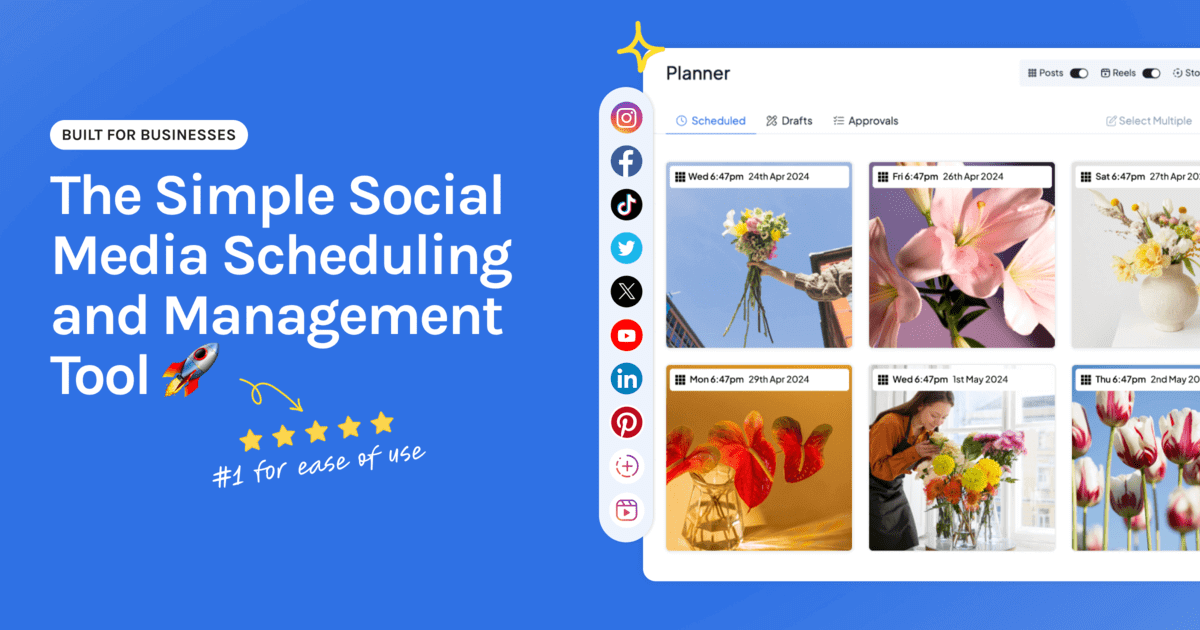
Planoly is a favorite for a reason. It treats your Instagram feed as a feed, and planning a grid in it feels good. People rarely leave because they’ve gone off visual planning. They leave because their posting has outgrown Instagram and Pinterest, and they’re now running a second tool for everything else.
This is an honest look at the best Planoly alternatives in 2026. We build Hopper HQ, so it leads the list, and we’ll be straight about where Planoly or another tool fits better.
Start your free 14-day trial →
What Planoly is good at
Planoly is a dedicated visual planner for Instagram and Pinterest. The grid preview, drag-and-drop planning, and link in bio tool are built for creators and brands whose profile does the selling. If Instagram is your main channel, it’s a focused, well-made choice.
Why people move on from Planoly
More networks. TikTok, LinkedIn, Facebook, and YouTube Shorts join the plan, and a tool centered on Instagram starts to feel like half the picture.
Two calendars. Running a second scheduler for the other networks means no single view of the month.
Limits and tiers. Upload or post limits tend to appear during a launch, which is the worst time.
Team needs. A second person, or a client who has to approve posts, changes what you need.
Planoly alternatives at a glance
| Tool | Best for | What stands out |
|---|---|---|
| Hopper HQ | Grid planning plus every other network | Grid preview, auto-publishing, per-account pricing |
| Later | Instagram-first brands | Visual planner and link in bio |
| Plann | Planning with strategy prompts | Guidance on what to post |
| Pallyy | Visual planning on a small budget | Grid planner with a limited free plan |
| Tailwind | Pinterest-led brands | Built around Pinterest scheduling |
| Buffer | Simple, clean scheduling | Approachable free tier |
| Metricool | Analytics and ads together | Reporting plus ad management |
Pricing note: Hopper HQ is $5 per connected social account per month on Grow, or $10 on Scale with unlimited users and approvals, billed annually ($6 and $12 billed monthly), with every feature on every plan. Other tools change their prices often, so this guide compares them on durable features instead. Check each tool’s pricing page for current numbers. Hopper HQ prices verified October 27, 2026.
What to look for in a Planoly alternative
A grid preview you trust. Test it with your real images, and check it against your live profile.
The networks you post to. All of them, in one calendar.
True auto-publishing. Posts, Reels, Stories, and carousels that go out without a reminder.
Link in bio included. If your bio link drives sales, make sure it isn’t on a higher tier.
Pricing that grows sensibly. Know what a second brand or a busy month costs.
The 7 best Planoly alternatives
1. Hopper HQ, best for grid planning plus every other network
Hopper HQ keeps the feed-first approach and extends it. Plan your Instagram grid, then plan TikTok, Facebook, LinkedIn, X, Pinterest, Threads, Bluesky, and YouTube Shorts in the same calendar.
Key features: a grid preview, drag-and-drop calendar, bulk upload, auto-publishing for posts, Reels, Stories, and carousels, a Pinterest scheduler, a link in bio page, analytics, and a hashtag explorer.
Best for: creators and small brands who love visual planning and now post to several networks.
Pricing: $5 per connected social account per month on Grow, or $10 on Scale with unlimited users and approvals, billed annually ($6 and $12 billed monthly). Every feature is on every plan, and every plan starts with a free 14-day trial.
Hopper HQ vs Planoly: both plan the grid visually and both include link in bio. Hopper HQ covers more networks from one calendar and prices per account with no feature tiers.
Watch for: if Instagram really is your only channel, the case for switching is weaker.
2. Later, best for Instagram-first brands
Later is the closest like-for-like option, with a strong link in bio tool.
Key features: visual planner, media library, grid preview, and link in bio.
Best for: brands that want to stay Instagram-first with a larger, established tool.
Watch for: plans sold as social sets, with post limits on lower tiers. See Planoly vs Later and Later alternatives.
3. Plann, best for planning with strategy prompts
Plann adds content guidance to grid planning.
Key features: visual grid planning, strategy tools, link in bio, and analytics.
Best for: creators who want help deciding what to post.
Watch for: Instagram-centric, like Planoly.
4. Pallyy, best for visual planning on a small budget
Pallyy is a visual scheduler with a grid planner and a limited free plan.
Key features: grid planning, a visual calendar, and a link in bio tool.
Best for: solo creators watching the budget.
Watch for: plans sold per social set. See Pallyy alternatives.
5. Tailwind, best for Pinterest-led brands
Tailwind is built around Pinterest, with Instagram alongside.
Key features: Pinterest scheduling tools and design helpers.
Best for: brands that used Planoly mainly for Pinterest.
Watch for: it’s less suited to planning a wide mix of networks.
6. Buffer, best for simple, clean scheduling
Buffer keeps things plain, with an approachable free tier.
Key features: publishing queues, a clean interface, and a link in bio page.
Best for: text-led posting across a few channels.
Watch for: you’ll miss the grid. See Buffer alternatives.
7. Metricool, best for analytics and ads together
Metricool leads with reporting and also schedules.
Key features: cross-network analytics, competitor tracking, and ad reporting.
Best for: creators who’ve started running ads and want the numbers in one place.
Watch for: a less visual planning experience. See Metricool alternatives.
How to switch without breaking your feed
- Download your media. Pull down anything you edited or captioned inside the tool.
- Save your link list. Copy every link and label from your link in bio page.
- Rebuild the bio page first, then change the link in your profile.
- Recreate your next nine posts in the new grid preview and check the layout.
- Watch one week publish before you cancel.
Want to see how a layout looks before you commit to anything? The free Instagram grid planner needs no login. For more options, see our best Instagram feed planners guide.
How to choose
- Grid planning plus every other network: Hopper HQ.
- Staying Instagram-first: Later.
- Help deciding what to post: Plann.
- Visual planning on a small budget: Pallyy.
- Pinterest above all: Tailwind.
- Plain scheduling on a free tier: Buffer.
- Analytics and ads in one place: Metricool.
Frequently asked questions
What is the best Planoly alternative?
If you want Planoly's grid-first planning for more than Instagram and Pinterest, Hopper HQ gives you a grid preview plus one calendar for every major network, with auto-publishing and link in bio on every plan, from $5 per connected account per month, billed annually. If you want to stay Instagram-only, Later and Plann are the closest matches.
What is Planoly best at?
Planoly is a dedicated visual planner, best known for Instagram grid planning and its link in bio tool, with Pinterest alongside. It suits creators who think about the feed as a whole.
Why do people switch from Planoly?
Most often because they've started posting to more networks and want them all in one calendar. Others want simpler pricing, fewer limits, or team features. If Instagram is your whole world, Planoly may still be the right fit.
Is Planoly or Later better?
They're close on Instagram planning, and the choice often comes down to interface and price. Our Planoly vs Later comparison goes through the differences.
Is there a free alternative to Planoly?
Hopper HQ's Instagram grid planner is free and needs no login, though it only previews and doesn't publish. Meta Business Suite schedules Instagram and Facebook for free without a grid preview. Buffer, Metricool, Publer, and Pallyy have limited free plans.
Will I lose my link in bio page if I leave Planoly?
The page lives with the tool that hosts it, so you'll need to rebuild it. Save your links first, publish the new page, then update the link in your profile so it's never broken.
Take your social game further with Hopper HQ.
Plan, schedule and auto-post to every channel in one place. Free for 14 days · Cancel anytime.